

Twitter lets users block keywords, Hashtags & Conversations
All the tweeps who were restless, upset and anxious about the hateful words on Twitter should know about this new roll-out from Twitter, which is to block and hide the hateful content from your timeline. Though a few abuses didn’t affect or stopped the opinion sharing on discussion forums but still it was disturbing and annoying for many users. Twitter is offering them to monitor the unwanted slurs or abuses and police them. Earlier the user could only block the accounts of others, now tweets containing keywords, Hashtags, phrases, Emojis, and username can be blocked from push notifications when someone mentions you in the tweet.
Henceforth, Twitter has restructured the process of reporting tweets that can possibly violate the Hateful Conduct Policy. For instance, the user can report the tweet as ‘abusive or harmful’, they will be asked how it is hateful or abusive for you, is it against race, gender, religion or orientation. This should also indicate whether the target of this hateful content is a person or some other entity. These new additions will make things a bit tedious for the technical team of Twitter, while reviewing the reports they have to make sure the content has been checked and monitored accurately as per the complaints received from the users.
Though the blocking option will allow you not to be exposed to such violating tweets at least on your notifications tab, but these tweets will somewhere else be accessible on the network. Supposedly, you are blocking a keyword or Hashtag, as long as the tweet isn’t directed to you personally, the content will show up on your timeline and also in search results.
Process of blocking keywords, conversations:
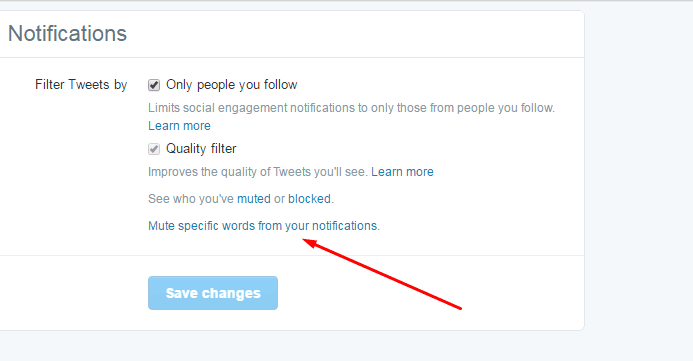
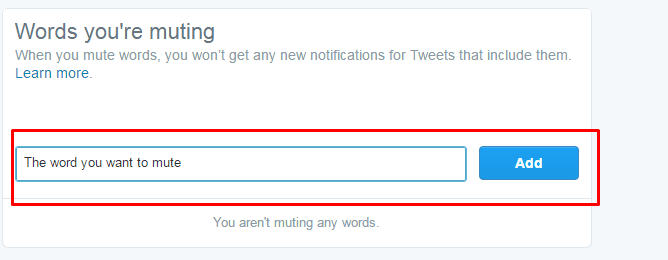
Go to the settings option on the notification tab in twitter’s mobile app or open notification option in settings tab on twitter’s official website. Expand a tweet from the conversation, click the downward arrow and select mute option to block a tweet or entire conversation.
See also: How to drive maximum engagement on Twitter.
Drawback
This attempt from Twitter shows its sincerity to support its users from the experience of getting abused all the time by some notorious and cynical groups. The effort is still not enough to save you from derogatory statements but this will help in hiding them from your timeline. It’s like masking it for a while from a few, but it won’t disappear from the network, rather it will remain accessible. All twitter csn do for you is that it will not appear in your personal mentions and push notifications that you receive.
Problems while perceiving the content
The most commonly found problem while reviewing the abusive content reported by the users is that they were not understood in correct context in the first place. Sometimes, different backgrounds and cultures ignite an unnecessary trouble for the tweeps. The language difference is one thing and the difference of cultures is an entirely distinguished barrier to sort out. As its about knowing the right reference to which the point had made.
Therefore, it’s challenging for twitter to educate and train its employees to differentiate, spot and remove distasteful content from the network. For many users, facing abusive comments was insulting and they decided to sign off from the network, which would have definitely affected and questioned the proficiency and safety of Twitter.
See also: Increase Twitter Followers, Retweets and Favorites.
So far so good
By introducing this feature, Twitter is trying to win back those lost connections and it’s the first small step in the right direction to gain their trust again. For some users, this is not something that Twitter is taking serious action against, but this new roll out shows that they are equally worried and willing to do something in order to make the users free from abusive content across the network, irrespective of any barrier or restriction imposed due to culture or region.
Even the officials of Twitter are not satisfied with this roll –out, according to Del Harvey, VP of Twitter states that twitter is going to come up with some more features that won’t just hide the abuses under the rug, rather will remove from permanently from the network.
