


Every sports fan has dreamed up the perfect stadium: a glass roof that opens at sunset, a lawn that glows after dark, seats so steep you could drop a popcorn from the top row. What if that place had a host who could walk viewers through it? A talking photo of a charismatic presenter, built in Pippit, makes it possible without a single construction permit. You design the arena, write the tour, and let your presenter sell the dream. Whether it’s for a game, a story, or just the joy of making things up, this guide shows you how. Open Pippit and let’s break ground.

Dreaming up a stadium that doesn’t exist
Start with one big idea. Maybe your arena floats above a harbor, or sits inside a dormant volcano, or rotates so every seat gets the best view eventually. A single bold feature gives the tour a focus and gives your presenter something exciting to announce. Then add a few smaller touches: the team colors, the mascot, the weirdest snack at the concession stand. Imaginary places feel real when they have specific details, so invent the ridiculous ones too. Write a short fact sheet with the arena’s name, location, capacity, and one rule that makes it different from every other venue. Everything else grows from that page.
Crowd noise on demand
A stadium is mostly sound, and SeedAudio 1.5 gives your presenter a believable roar to stand in front of.
Ambience from a description
Write what you want, such as a packed evening crowd with distant chants and an announcer’s echo, and the ambience is generated along with the dialogue and any music you ask for.
Footage that gets its own audio
If you already have a stadium render or animated flythrough, the model can read the video and produce sound that follows its action.
Louder cheers, quieter commentary
Voice, effects, ambience, and music come as separate tracks, so you can lift the crowd for a big reveal without drowning the presenter.
Cheers on the beat
Timestamps help the whistle blow or the crowd erupt at the exact moment your presenter says the magic words.
What your presenter needs to know
Before you write the script, gather the facts your presenter will drop into the tour:
- The arena’s name and the story behind it.
- Capacity, with at least one number that sounds impressive.
- The home team, their colors, and their mascot.
- Three must-see spots, such as the tunnel, the pitch, and the rooftop terrace.
- One signature tradition that fans repeat before every match.
From blueprint to broadcast in three steps
Your arena is planned and your presenter is ready. Here’s the quick route through Pippit.
Step 1: Invite the presenter
Log in to Pippit and then select the Video generator.
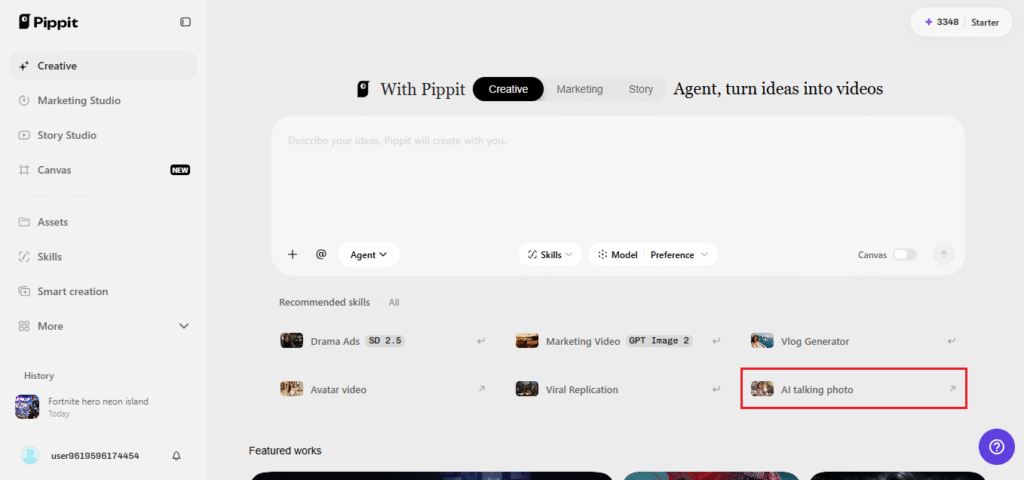
Choose the AI feature of getting your image to speak and then drag and drop your presenter’s image into the upload area or simply click to choose an image. Your image should have a minimum of 256×256 pixels size. Mark the checkbox showing your consent to use it and hit the Next button.
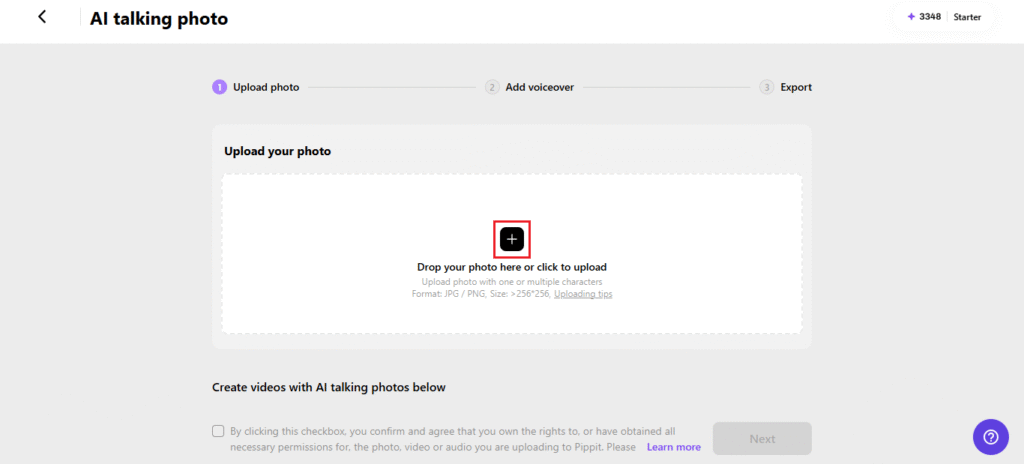
Step 2: Give the presenter a microphone
Select Read out script and input the script of your video. Select the language and experiment with various voices to get a confident and energetic voice. Choose your caption style and click on Save. You can even upload your own audio file or use a trending one.
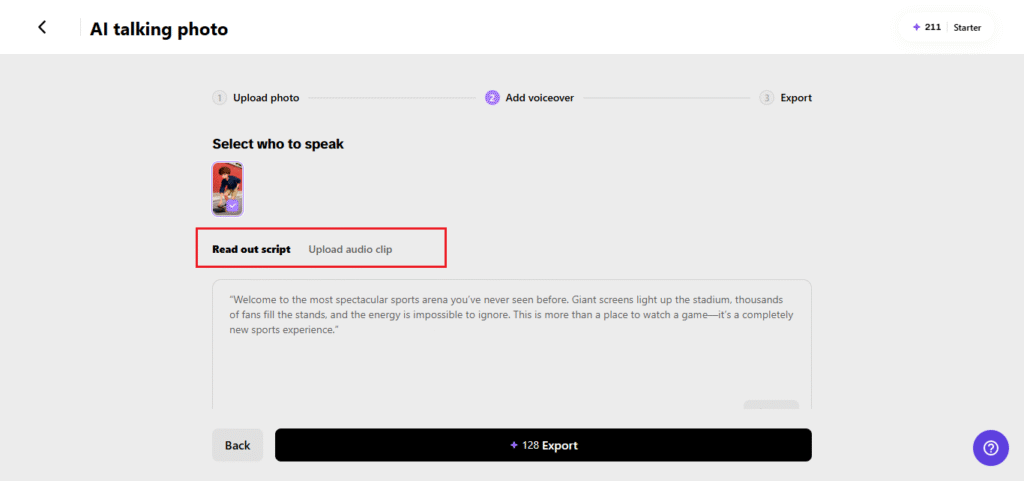
Step 3: Take the broadcast live
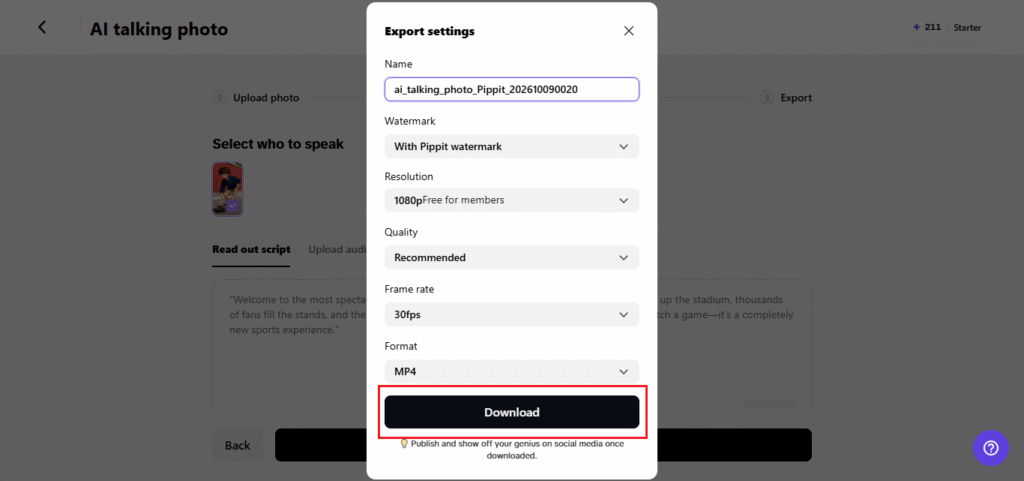
Click Export and name the video. Decide on the watermark, then set the resolution, quality, frame rate, and format. Press Download and your arena tour is saved to your device.
Commentary that sounds live
Sports presenters have a rhythm worth borrowing. They speak in quick bursts, build toward a peak, then drop into a calmer detail. Try that pattern in your tour: announce the big feature loudly, then explain it plainly. Use present tense so everything feels like it’s happening now, as in “We’re walking through the tunnel, and listen to that roar.” Add small emotional beats like pride or awe. Avoid reading numbers in long strings, since they’re hard to follow by ear. Pick one standout statistic per section and give it room to land. A line like “Eighty thousand seats, and not a bad one in the house” works better than a full spec sheet.
Where an imaginary arena earns its keep
Fictional venues have more uses than you’d think. Game designers can introduce a fantasy sports league and pitch its world. Writers can show off the setting of a novel before the first chapter. Teachers can help students imagine architecture, geometry, or city planning. Friends running a pretend league can use the tour as their opening ceremony. Even small brands sometimes create a made-up arena as a playful backdrop for a campaign. In every case, hearing a confident presenter describe the place makes it feel solid, as though viewers could buy tickets tomorrow.
Small things that sell the scale
If the arena feels small, check a few details. Mention height and distance, like how far the upper deck sits from the pitch. Describe sound, such as how the roof makes a single drum echo across the stands. Add weather, because an open roof at sunset or a closed one during a storm gives the place a mood. Use comparisons people know, like fitting a dozen city buses inside the main hall. And keep your presenter’s pose and background steady across clips so the arena feels like one place rather than several. Little specifics add up, and they convince viewers they’re really standing in the concourse.
Your stadium doors are open
An imaginary arena only needs three things: a big idea, a confident voice, and a way to share both. Pippit supplies the last two. Upload your presenter, write the walk-through, and let the crowd noise do the rest. Fans will believe the place is real long before they remember it isn’t. Open Pippit now and welcome everyone inside.
