


If you are a frequent Youtube viewer, you must have noticed a controversial change made by this Google-owned platform a few months back? Yes, we are talking about the hidden Youtube video dislike count. Unlike previously, now Youtube doesn’t show you the dislike count on videos across the platform. Yes, a dislike button is still available beneath a video, but you can’t see the number of Dislikes on other public videos which aren’t yours. You can only see the count on video views, number of likes and comments on a public videos.
But do you know why the Youtube video dislike count is hidden? If not, read this article until the last to get all your answers. Not only this, but we will also share a mind-blowing and 100% working hack with you about how to view the hidden dislike count on a particular Youtube video. So, let’s start without any delay.
The reason behind hiding the Youtube Videos Dislike Count
Last year in November, Youtube announced that it would be hiding the videos dislike count across the platform to safeguard the creators against personal attacks. According to the platform, many popular and even small digital video creators get attacked using the Youtube dislike button by their haters and competitors.
As a negative marketing strategy, their haters and competitors increase the dislike count on their videos from multiple fake accounts to demoralize them. This likes and dislikes count ratio on any video influences people’s decision of watching that content. So, to criticize such practices and put a stop to them, Youtube decided to hide this count publicly so creators can stress-free create and upload content on the platform.
But this doesn’t mean that people cannot dislike content they are not liking. There is a dislike button still available beneath every Youtube video, and when a viewer dislikes some content, only the creator gets to know about it. In simple words, only an editor or a creator who has access to that account or channel can see the dislike count on their videos to improve the content, but it is not publicly visible by other viewers.
While this move has its own advantages for creators, it has some disadvantages as well for viewers. By not being able to see the dislike count on a particular youtube video, people end up watching not-so-good or irrelevant content. That is why there is an absolutely mind-blowing and 100% working hack available to watch this hidden youtube video dislike count for your information. Let’s see how.
How to Watch the hidden dislike count on Youtube Videos? – 100% Working and Free
If you want to see Dislike count of your Youtube videos alone then follow these steps:
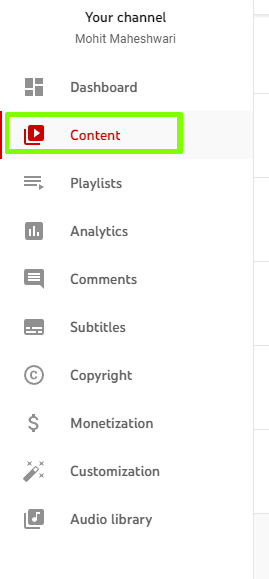
- Go to Youtube Studio. On the left side, click on “Content” as show in the below image.

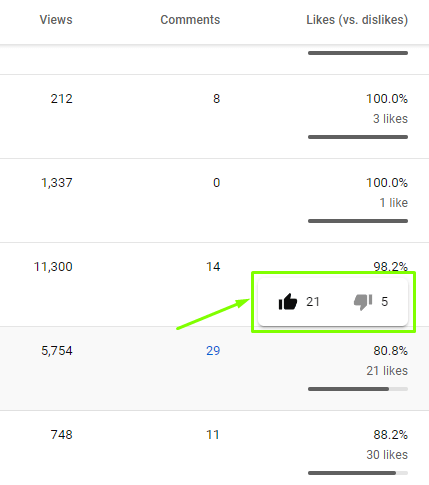
- Now hover your mouse pointer on top of the likes count, you’ll be able to see dislikes count as well as shown in the image below.
If you’re not happy with this Youtube update and want to watch the hidden dislike count on all the Youtube videos, there are two free browser extensions for it, i.e. VidIQ and Return Youtube Dislike. These extensions are available for both Firefox and Mozilla browsers. Here is a step-by-step guide to install and use these browser extensions to watch the hidden dislike count on Youtube Videos.
(See also: Buy YouTube Views)
Follow these to Install VidIQ browser extension to watch the hidden Youtube videos dislike counts:
- Go to the official website of VidIQ using the link we have mentioned above. In the menu option at the top of the screen, you will find the “Extension” tab.
- Click on that tab, and it will redirect you to the other screen to install the extension.
- Click on the Install option, and it will redirect to a browser add-on page. Here, you can provide permissions to the extension and install it afterwards.
- After the successful installation, when you play any video on Youtube, you will be able to see the hidden dislike count of that video along with other metrics like total views, views per hour, etc.
Follow these to Install “Return Youtube Dislike” browser extension to restore the hidden Youtube videos dislike counts:
- Go to the official website link we have mentioned above and search for its browser extension. This extension fetches all the data directly from Youtube’s official database and is thus 100% safe to use.
- Upon clicking on the extension tab, you will be redirected to another screen to install the browser extension.
- Before installing, the browser will ask for granting permissions. Once you provide the permissions, the extension will be downloaded for your browser choice.
- Now, you can play any Youtube video using this extension to watch the hidden Youtube videos dislike count for free.
Final Words!
We hope that now you know the reason behind hiding the Youtube video dislike count along with the working hack of restoring it. Both the browser extensions we have mentioned in this article are 100% working, safe and legal. So, you can try them without any second thoughts to decide which content is worth watching on Youtube. For more amazing Youtube tips and tricks, check out our related articles!
