Close Menu
    Facebook X (Twitter) Instagram
    The SocioBlend BlogThe SocioBlend Blog
    • Social Media
    • Technology
    • Business
    • SEO
    • Content Marketing
    • Write for us
    The SocioBlend BlogThe SocioBlend Blog
    Home»Social Media»How to Unblock Someone on Snapchat in 60 Seconds (and What Happens Next)
    Social Media

    How to Unblock Someone on Snapchat in 60 Seconds (and What Happens Next)

    Mohit MaheshwariBy Mohit MaheshwariJuly 24, 2025Updated:August 24, 2025No Comments4 Mins Read
    Unblock Someone on Snapchat in 60 Seconds
    Unblock Someone on Snapchat in 60 Seconds
    Share
    Facebook Twitter LinkedIn Pinterest Tumblr WhatsApp

    TL;DR
    Profile → ⚙️ Settings → Privacy Controls → Blocked → tap ✖︎ next to their name → confirm.
    Streaks stay dead, saved chats reappear once you re‑add the friend.

    Why People Block and Later Regret It

    Spammy streak‑beggars, creepy exes, mis‑taps while clearing a chat. Whatever your reason, the unblock button exists. Use it when you realise cutting someone off broke a streak, hid old memories, or just felt petty. Let’s see how to block or unblock someone on Snapchat.

    Step‑by‑Step Guide

    Step 1. Open Settings
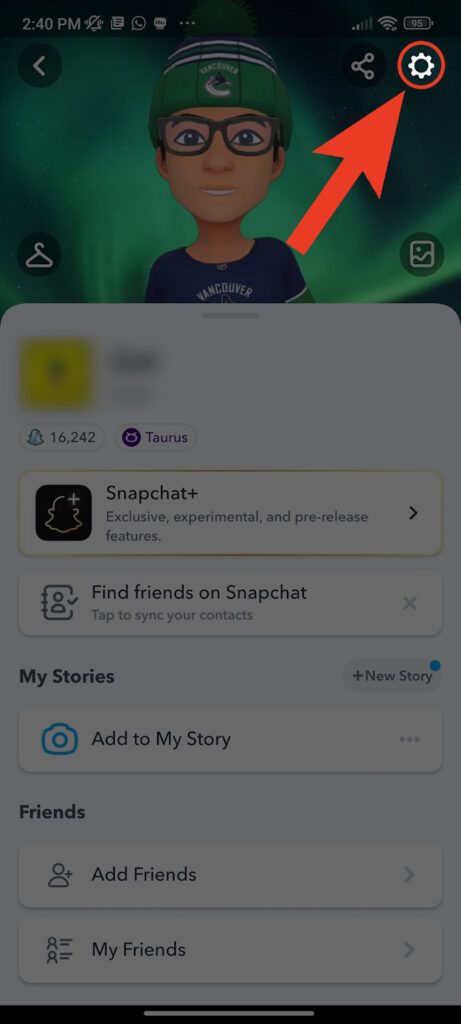
    go to settings Snapchat
    Settings on Snapchat

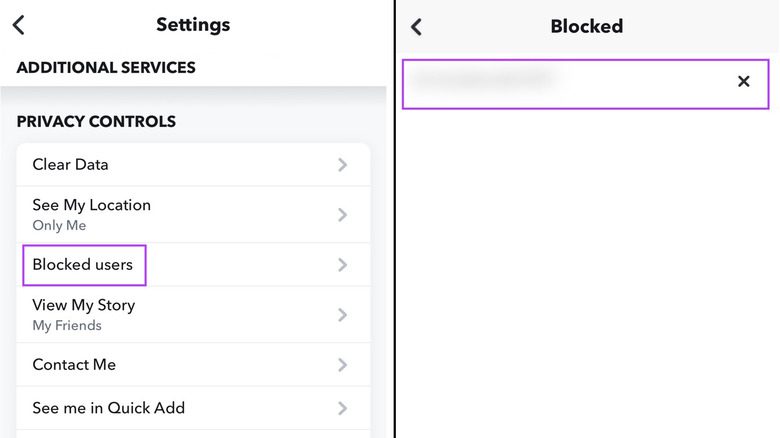
    Step 2. Head to Blocked Users

    Snapchat Settings menu with ‘Blocked users’ option highlighted
    Step 2. Scroll to Privacy Controls → Blocked.

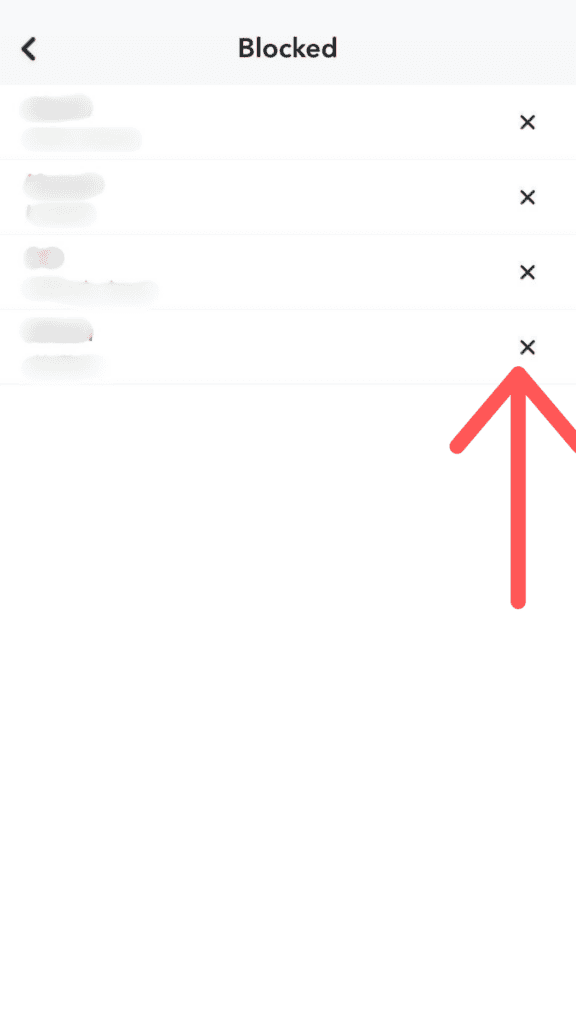
    Step 3. Unblock

    Blocked users list showing the X to unblock
    Step 3. Tap the ‘✖︎’ beside their name.

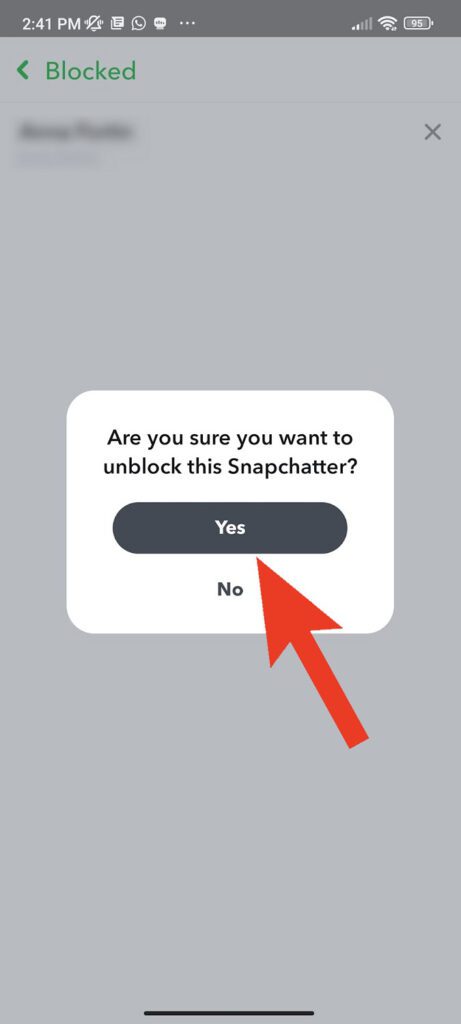
    Step 4. Confirm

    Snapchat prompt asking to confirm unblocking
    Step 4. Hit ‘Yes’. Done.

    Also read: Snapchat vs TikTok: Which Is Better and Why?

    What Changes After You Unblock

    Unblocking flips a few switches under the hood but it doesn’t magically restore everything you lost. Here’s exactly what resets, what stays broken, and what you still have to do manually.

    FeatureWhat happens
    StreaksLost for good. Snapchat support will not restore them.
    Saved chatsStill there once you re‑add each other.
    Friend statusYou must send a friend request again; they decide to accept or not.
    Story viewsYour past story views stay in their list. Future stories depend on privacy settings.
    Snap MapThey see you only if you re‑add and you share location.

    Troubleshooting

    Running into weird errors or can’t find the person you just unblocked? Check these quick fixes before you assume Snapchat is glitching out.

    ProblemFix
    They don’t appear in BlockedYou removed, not blocked. Search their username (not display name) and add them.
    They can’t add me backYou still have them blocked. Double‑check Blocked list.
    Both of us blocked each otherEach side must unblock before anyone can add.
    Username says “User not found”They deleted their account or blocked you back. Wait 24 h then retry.

    Privacy and Etiquette Tips

    1. Think before re‑adding. If it was harassment, keep them blocked.
    2. Avoid rapid block‑unblock cycles; Snapchat might lock the feature temporarily.
    3. After reconnecting, keep early chats light. No deep oversharing on day one.

    Also read: Snap Star in 2025: Requirements, Perks, and How to Apply

    FAQ

    Will Snapchat notify them that I unblocked them?
    No, they’ll only notice if you send a new friend request.

    Do I get my streak back?
    No. Once broken, it’s gone.

    Can I unblock on Snapchat Web?
    Not yet. Use the mobile app.

    Is there a limit on how many times I can block someone?
    Snapchat throttles excessive toggling. Chill for a day if the option disappears.

    Can I increase my followers instantly after unblocking someone?
    Unblocking restores the connection, but it won’t grow your audience. If your goal is to expand reach, you’ll need to build engagement the slow way or explore options from Socioblend’s services to buy Snapchat followers. Just remember that follower count isn’t everything; engagement matters more.

    Further Reading

    • Official Snapchat Help: Block or Unblock Friends
    • How to Disable Snap Map Without Looking Shady
    • The Quickest Way to Recover a Deleted Snapchat Message

    Unblocking is fast. Repairing a friendship takes longer. Use the steps above, keep your expectations clear, and move on. If you found this article helpful, then you can share this article on your socials.

    Think you’ve got the difference between blocking and removing nailed? Take the quick quiz below and see if your score backs it up.

    Blocked vs. Removed – Do You Know the Difference?

    1 / 3. If you block someone, can they still see your Stories?
    2 / 3. What happens to your chat history when you remove a friend?
    3 / 3. Can a removed user still send you Snaps?

    Snapchat Unblock Snapchat
    Mohit Maheshwari
    • Website
    • Facebook
    • X (Twitter)

    SEO Analyst and a part-time Content Writer.

    Related Posts

    The Day Reddit Went to War With EA: The Most Downvoted Comment in Internet History

    January 25, 2026

    Quora Spaces: The Complete Guide to Building Authority and Monetizing Your Expertise

    January 24, 2026

    WhatsApp Desktop Just Got Worse. Here’s Why

    January 22, 2026

    15 Common RedNote Problems and How Foreign Users Can Fix Them

    January 18, 2026
    Recent Posts
    • Why the Biggest Companies Look Terrible on Trustpilot January 26, 2026
    • The Day Reddit Went to War With EA: The Most Downvoted Comment in Internet History January 25, 2026
    • Quora Spaces: The Complete Guide to Building Authority and Monetizing Your Expertise January 24, 2026
    • WhatsApp Desktop Just Got Worse. Here’s Why January 22, 2026
    • Anna Kasprzak Net Worth: How an Olympic Rider Became a Billionaire January 20, 2026
    • 15 Common RedNote Problems and How Foreign Users Can Fix Them January 18, 2026
    • How to Use Snipping Tool on Windows & Mac (With Shortcuts + Tips) January 12, 2026
    Categories
    • Business
    • Content Marketing
    • News
    • SEO
    • Social Media
    • Technology
    • Twitter
    Social Media

    Why is Youtube Video Dislike Count hidden, and how to view them?

    By Divya GuptaFebruary 18, 20220

    If you are a frequent Youtube viewer, you must have noticed a controversial change made…

    Facebook Announces Crypto Currency “Libra” – All You Need to Know

    June 19, 2019

    Instagram Rolls Out AI Voice Translation and Trending Audio Shortcut for Reels

    June 4, 2025

    Top 10 TikTok Videos of 2019

    May 14, 2019
    The SocioBlend Blog
    Facebook X (Twitter) Instagram Pinterest Vimeo YouTube
    © 2026 SocioBlend. Developed by Jitendra Kumar Singh.

    Type above and press Enter to search. Press Esc to cancel.