

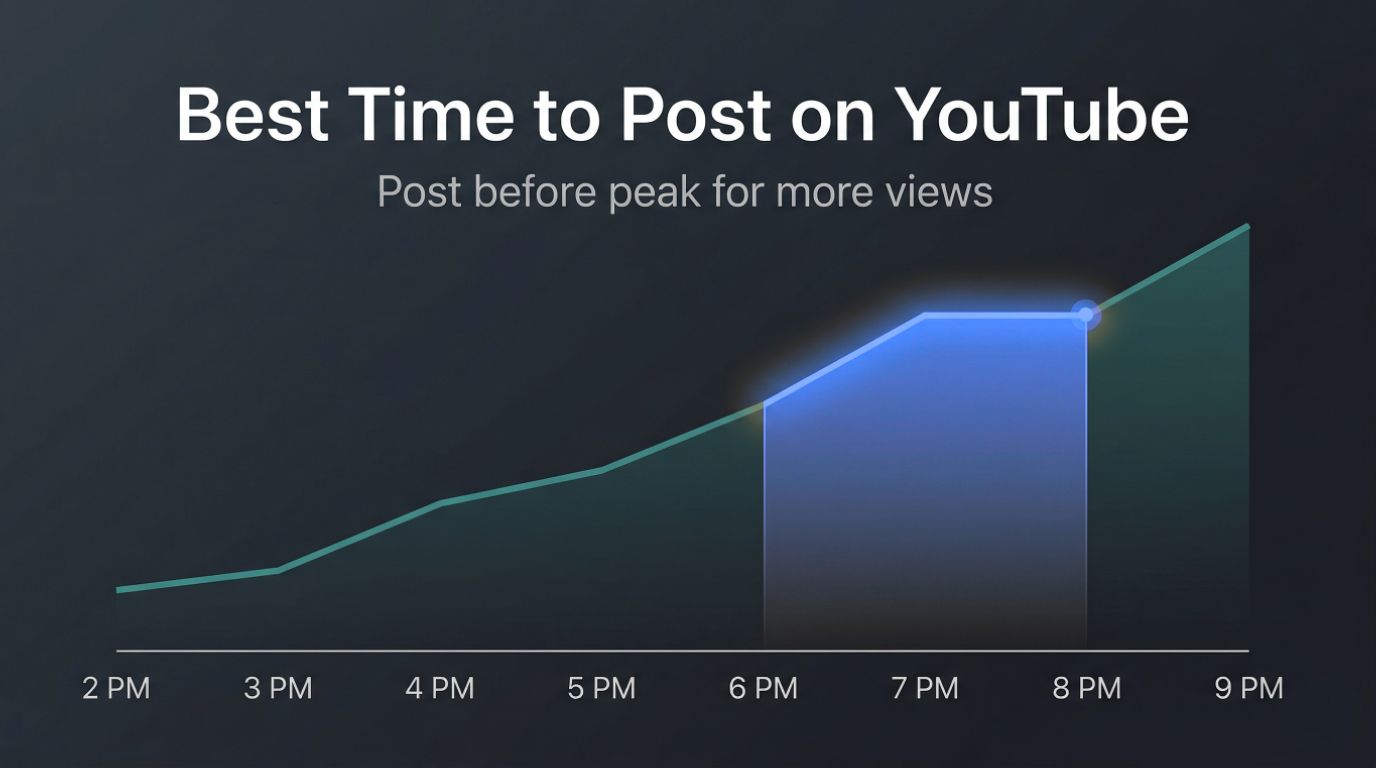
If you’ve ever uploaded a video, waited, and seen almost no views, you’re not alone.
Most creators assume the problem is the content. Sometimes that’s true. But in many cases, the issue is much simpler. Your video went live when your audience wasn’t active.
Timing does influence performance. Not because YouTube boosts videos based on the hour you publish, but because your video needs a strong start. The first few hours after publishing often determine whether your video gets pushed to more people or fades out early.
Before we go deeper, here’s a quick answer most people are looking for.
Best Time to Post on YouTube (Quick Answer)
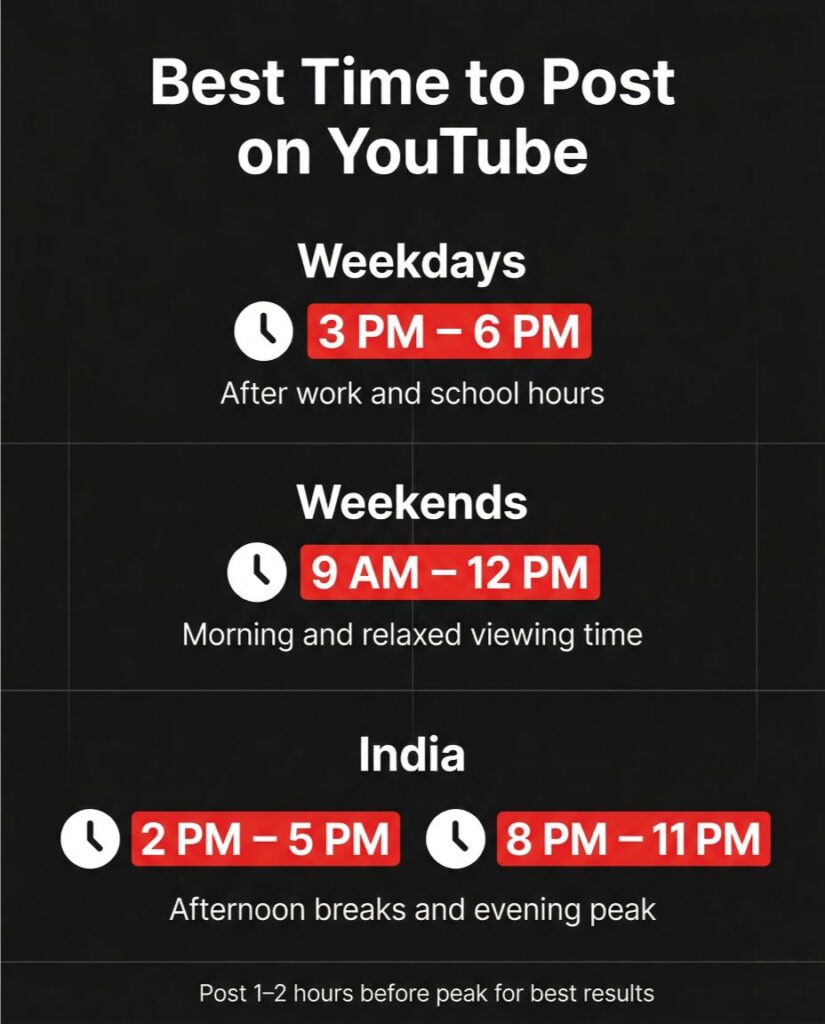
- Weekdays: 3 PM to 6 PM
- Weekends: 9 AM to 12 PM
- India: 2 PM to 5 PM and 8 PM to 11 PM
These time ranges work as a starting point based on general user behavior.
But they are not universal.
The right posting time depends on when your audience is online. What works for a gaming channel in the US may not work for an educational channel in India.
That’s exactly what this guide will help you figure out.
By the end, you’ll know:
- How timing actually affects your video performance
- When you should post based on your audience
- How to build a simple posting system that works consistently
Does Posting Time Really Matter on YouTube?
Yes, it does. But not in the way most people think.
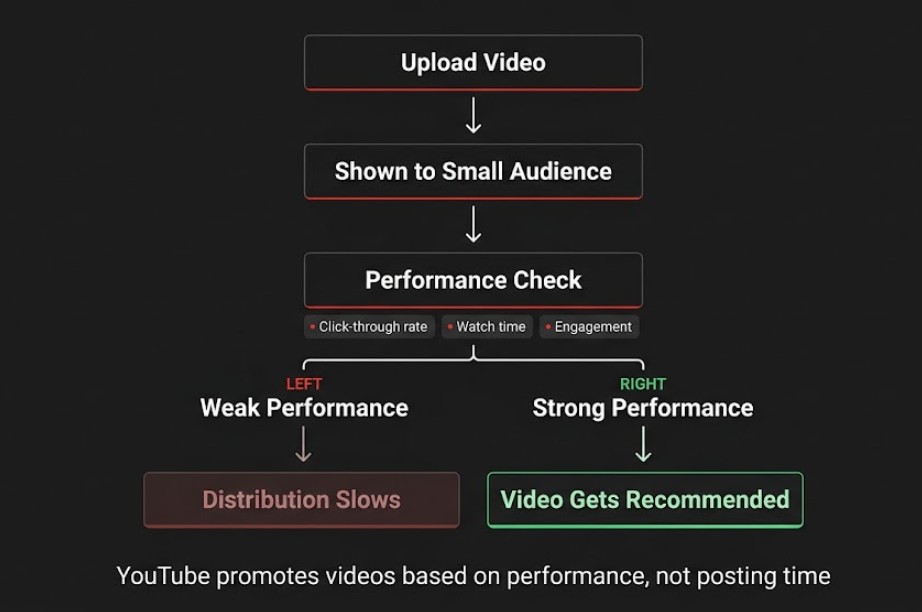
YouTube does not rank videos based on the exact time you publish. It evaluates how viewers respond after your video goes live. That includes clicks, watch time, and overall engagement.
Here’s what happens behind the scenes.
When you upload a video, YouTube shows it to a small group of viewers first. Based on how they respond, the platform decides whether to expand its reach.
If your video gets:
- Strong click-through rate
- Good watch time
- Early engagement
It gets pushed further.
If it does not, distribution slows down.
Now consider timing.
If you post when your audience is not active, fewer people see your video in those early hours. That leads to weaker signals, and your video struggles to gain momentum.
If you post when your audience is active, more people are available to click and watch. That improves early performance and increases your chances of getting recommended.
So timing is not a shortcut. It simply improves your chances of a strong start.
At the same time, it is only one part of the equation. Even if you post at the right time, your video still needs to attract clicks and hold attention.
If you want consistent growth, you need to combine timing with the fundamentals that actually drive views. That includes better titles, thumbnails, and retention.
Let’s now look at general posting patterns you can use as a starting point before moving to your own data.
Read also: YouTube Community Posts Explained: Strategy, Examples, and Tips
Best Time to Post on YouTube (Data You Can Start With)
Let’s keep it simple.
You are looking for a clear answer. While there is no single perfect time that works for every channel, there are consistent patterns based on how people use YouTube.
Use these as your starting point.
Best Time to Post on YouTube (Weekdays)
- 3 PM to 6 PM
Most users start browsing YouTube after school or work. This is when activity begins to rise and continues into the evening.
Best Time to Post on YouTube (Weekends)
- 9 AM to 12 PM
Viewers are more relaxed on weekends. Many watch longer videos during the morning and early afternoon.
Best Time to Post on YouTube in India
- 2 PM to 5 PM
- 8 PM to 11 PM
These time slots align with mobile usage patterns in India, especially during breaks and late evening viewing.
Do Not Post Exactly at Peak Time
This is one of the most common mistakes.
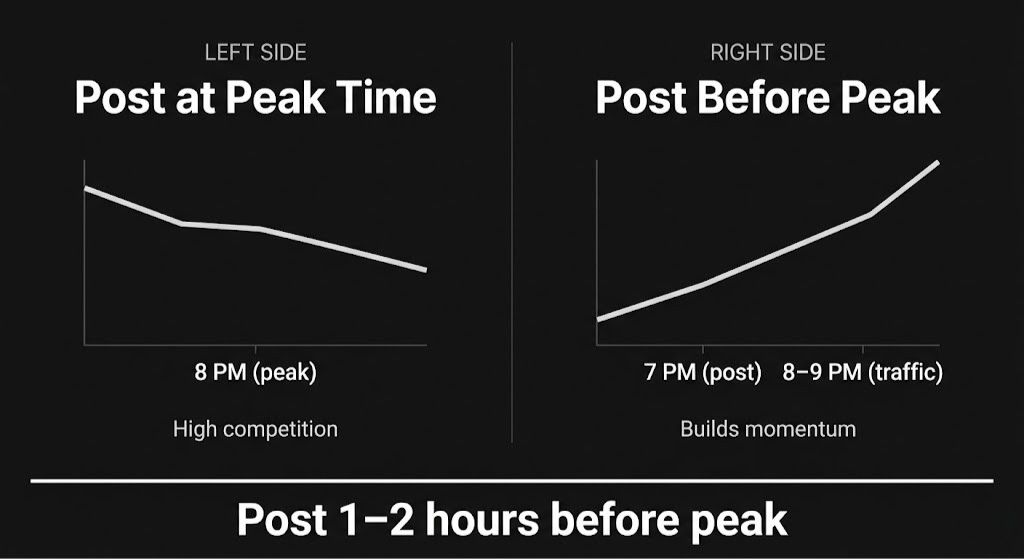
If peak activity is around 8 PM, posting exactly at 8 PM puts your video into heavy competition. Many creators are publishing at the same time, and your video has no momentum yet.
A better approach is simple.
Publish 1 to 2 hours before peak time
This gives your video time to:
- Get processed and indexed
- Start gaining initial clicks
- Build early watch time
So when more viewers come online, your video is already active and performing.
Use This as a Starting Point, Not a Rule
These time ranges help you avoid posting at low-activity hours. They give you a solid baseline.
But they are not your final answer.
The real advantage comes when your posting time matches your specific audience behavior, not general internet trends.
Now let’s look at how to use your YouTube analytics to find the exact times your audience is most active, so you can stop guessing and start posting with confidence.
How to Find Your Best Time to Post on YouTube (Using Your Own Data)
General timing gives you a starting point. Real growth begins when you follow your own audience.
YouTube already shows you when your viewers are active. Most creators either overlook it or do not use it properly.
Here’s how to turn that data into a clear posting strategy.
Step 1: Open Your Audience Insights
- Go to YouTube Studio
- Click on Analytics
- Open the Audience tab
Look for the section called:
“When your viewers are on YouTube”
You will see a graph with different shades of purple.
Step 2: Identify Your Peak Hours
- Darker purple means more viewers are online
- Lighter purple means lower activity
Focus on the darkest blocks. These represent your highest opportunity windows.
Step 3: Post Before the Peak, Not During It
This is where most creators go wrong.
If your peak is around 9 PM, posting at 9 PM puts your video into heavy competition with no momentum.
A better approach is to publish 1 to 2 hours earlier
For example:
- Peak at 9 PM → post at 7 PM or 8 PM
This gives your video time to:
- Process in full quality
- Get indexed by YouTube
- Start building early engagement
So when your audience comes online, your video is already active and gaining traction.
Step 4: Test and Refine Over Time
Do not depend on one upload.
- Try different days and time slots
- Track performance across 5 to 10 videos
- Compare views, watch time, and engagement
You will start to notice patterns. Certain days and times will consistently perform better.
That becomes your actual posting schedule.
What If You Don’t Have Enough Data Yet?
If your channel is new, this section may not show meaningful insights yet.
In that case:
- Use general timing as your baseline
- Stay consistent with your uploads
- Let YouTube collect audience data over time
At this stage, your focus should be on the fundamentals that drive views. Titles, thumbnails, and retention have a bigger impact than timing early on.
If you want a structured way to improve those areas, this guide on how to get YouTube views fast breaks it down step by step:
Once your videos start getting consistent traffic, your analytics will become your most reliable guide.
Now let’s look at a few advanced strategies that can help you get even better results from your posting time.
Advanced Strategies to Get Better Results from Your Posting Time
Once you understand when your audience is active, you can take things a step further. These small adjustments can make a noticeable difference in how your videos perform.
1. Upload Early, Publish at the Right Time
Do not wait until the last minute to upload your video.
YouTube needs time to:
- Process your video in HD and 4K
- Check content
- Prepare it for recommendations
If you upload and publish at the same time, your video may go live in lower quality or with delays.
Better approach:
- Upload your video a few hours earlier
- Schedule it to go live at your target time
This ensures everything is ready when viewers arrive.
2. Consistency Builds Algorithm Trust
Posting at random times makes it harder for YouTube to understand your audience behavior.
When you stick to a schedule:
- Your audience knows when to expect content
- YouTube can better predict who to show your videos to
You do not need to upload daily. Even once or twice a week is fine.
What matters is consistency:
- Same day
- Similar time
Over time, this creates a pattern that works in your favor.
3. Different Niches Have Different Peak Times
Not all audiences behave the same way.
Examples:
- Students and entertainment content perform better in the evening
- Business or finance content often works well in the morning
- Global audiences may have multiple peak windows
If your channel serves a specific niche, observe how your viewers behave instead of following general advice.
4. Timing Helps, But Early Momentum Matters More
Posting at the right time gives your video a better chance, but what happens after publishing matters more.
If your video gets:
- Strong clicks
- Good watch time
- Early engagement
YouTube is more likely to push it further.
This is why many creators focus on building early momentum along with smart timing. Some rely on their existing audience or sharing strategies, while others use external support to give their videos a stronger start.
For example, platforms like Socioblend allow creators to buy YouTube views to help kickstart engagement and improve visibility during those critical first hours:
Used correctly, this is not about faking growth. It is about giving your content a better chance to be seen in a highly competitive space.
5. Think Beyond Just “Posting Time”
Growth on YouTube is not a single variable game.
Timing is one part of a bigger system:
- Content quality
- Topic selection
- Packaging (title and thumbnail)
- Initial engagement
When these elements align, your posting time starts to amplify results instead of trying to carry the entire video.
Also read: How to Perform YouTube Competitor Analysis (Step by Step)
Common Mistakes That Kill Your YouTube Views (Even with Perfect Timing)
You can post at the right time and still get poor results. This is where most creators get frustrated.
They fix timing, but ignore the things that actually drive performance.
Let’s break down the mistakes that quietly hold videos back.
1. Posting Exactly at Peak Time
This sounds logical, but it often works against you.
If everyone is posting at 8 PM, your video enters heavy competition at the same moment. Your audience is flooded with options.
Better approach:
Publish before peak time, so your video already has activity when traffic increases.
2. Ignoring Thumbnails and Titles
Timing brings people to the platform. It does not make them click your video.
If your thumbnail and title are weak:
- People scroll past
- Your click-through rate drops
- YouTube stops pushing your video
You could post at the perfect time and still see no growth.
3. No Early Engagement Strategy
The first few hours matter the most.
If your video gets:
- No clicks
- Low watch time
- No interaction
YouTube assumes it is not worth promoting.
This is why creators focus on getting initial traction from their existing audience, sharing, or other growth methods. Timing helps, but early engagement is what keeps the video alive.
4. Copying Generic Advice Blindly
Many creators follow global timing without thinking about their audience.
Examples:
- Following US timings for an Indian audience
- Using gaming channel strategies for educational content
This leads to poor results even if the advice itself is not wrong.
Your audience behavior should guide your decisions.
5. Posting Randomly Without a Pattern
Uploading at different times every week makes it harder to build momentum.
Your audience does not know when to expect content. YouTube also struggles to identify patterns.
Even a simple schedule like:
- Every Tuesday and Friday
- Around the same time
can improve consistency and performance over time.
6. Expecting Timing to Fix Everything
This is the biggest mistake.
Timing is not a shortcut. It will not turn a weak video into a viral one.
It only improves the chances of a good video performing well.
If your content, packaging, and retention are not strong, timing will not compensate for it.
Avoiding these mistakes alone can improve your results more than just chasing the “perfect” posting time.
Let’s bring everything together and give you a simple action plan you can follow for every upload.
Final Takeaway: What You Should Actually Do
If you want a simple approach that works, focus on this.
1. Don’t Overthink the “Perfect Time”
Start with a reasonable window like afternoon or evening. That is enough in the beginning.
What matters more is getting your content out consistently.
2. Let Your Audience Guide You
As soon as you have data:
- Check when your viewers are active
- Adjust your posting time based on that
Your own audience behavior will always be more accurate than generic advice.
3. Post Before Your Audience Peaks
Do not wait for the exact peak hour.
Publish earlier so your video has time to:
- Get processed
- Gain initial clicks
- Build watch time
This gives it a better chance to perform when traffic increases.
4. Focus on the First Few Hours
Timing gets your video in front of people. What happens next decides everything.
If viewers are not clicking or watching, your video will slow down regardless of when you post.
That means you need to pay attention to:
- Titles and thumbnails
- Retention
- Early engagement
5. Build a System, Not Just a Schedule
Growth on YouTube comes from combining multiple factors.
Timing is one piece. It works best when supported by:
- Strong content
- Consistent uploads
- A clear growth strategy
If you treat timing as the only lever, results will stay inconsistent.
Bottom Line
There is no universal best time.
There is only:
- The right time for your audience
- The right setup to support your video
Get those two right, and your videos will start performing more consistently over time.
