


Have you noticed something wrong with WhatsApp on your computer lately? Maybe it takes a long time to open, or maybe your computer fans start spinning loudly just because you are checking a message.
If this is happening to you, you are not alone.
Recently, Meta (the company that owns WhatsApp) released a major update for the WhatsApp app on Windows. Usually, updates make things faster and better. But this time, users are saying the exact opposite.
Thousands of frustrated users have gone online to complain. They say the new app is slow, “heavy,” and difficult to use. Many feel like a fast, useful tool has been replaced by something that barely works.
Why is everyone so angry? Let’s read the article to find out what happened exactly.
Native vs. Web Wrapper: What Actually Changed?
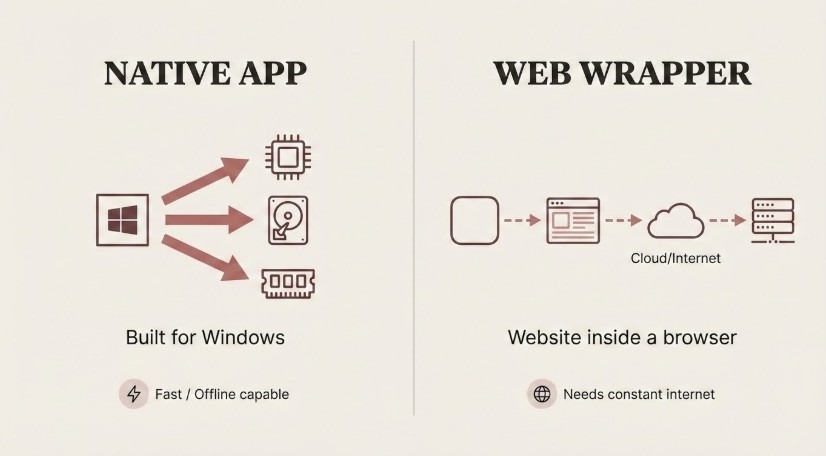
To understand why your WhatsApp feels slower, you need to understand the difference between a Native App and a Web App.
The Old Version (Native App) Think of the old WhatsApp like a piece of furniture built specifically for your house. It was a “Native” app. This means it was written specifically for Windows computers.
- It “talked” directly to your computer’s hardware.
- It saved messages on your hard drive, so they loaded instantly.
- It worked smoothly even if your internet connection flickered.
The New Version (Web Wrapper) The new version is more like a “Website in a Costume.” Tech experts call this a “Web Wrapper.”
- Instead of being a real program, it is basically a web browser (like Chrome or Edge) that only opens one website: WhatsApp Web.
- Because it isn’t built specifically for Windows, it uses a lot more power (RAM) to do simple things.
- It has to constantly download data from the internet instead of reading it from your computer, which causes that annoying “loading” delay.
Why did they do this? Most users believe Meta made this change to save money. By making the app a “web wrapper,” they only have to write the code once for all devices (Mac, Windows, and Web), instead of building a special version just for Windows users. Unfortunately, this makes the experience much worse for you.
The 5 Biggest Problems Users Are Facing
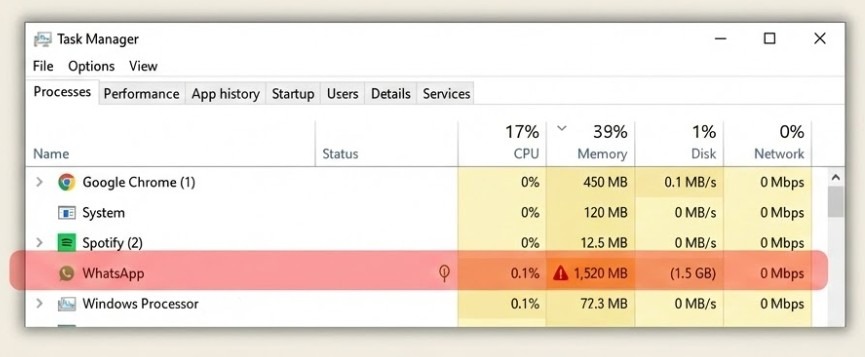
Because the new app is basically a website pretending to be an app, many features that users loved are now broken or missing. Here are the top 5 complaints from the community.
1. It Slows Down Your Whole Computer The biggest complaint is performance. Users report that the new app uses a huge amount of computer memory (RAM). One user mentioned their computer hard drives were “screaming” because the app was working so hard just to load a chat. If you have noticed your typing is lagging or your other apps are running slower, WhatsApp might be the problem.
2. No More “Drag and Drop” In the old version, if someone sent you a photo, you could simply click it and drag it onto your desktop to save it. It was fast and easy. Now, that feature is gone. You have to right-click, select save, and go through menus. It sounds small, but for people who work with images all day, this adds a lot of wasted time.
3. The “Loading” Screen That Never Ends Many users are getting stuck on the startup screen. Because the app doesn’t store data on your computer efficiently anymore, it has to “sync” with the server every time you open it. This leads to a long loading bar that sometimes freezes completely, forcing you to restart the app.
4. You Need Perfect Internet The old app was great because you could read old messages even if your internet went out. The new version relies almost entirely on an active connection. If your internet drops for even a second, the app stops working, and you can’t even scroll back to read past messages.
5. Basic Tools Are Missing Simple things we take for granted are suddenly broken.
- No Zoom: You can no longer pinch-to-zoom on photos.
- Bad Right-Click: When you right-click on something, it often looks like a web browser menu instead of a proper app menu.
- Audio Glitches: Some users report that playing voice notes messes up their computer’s audio settings.
Is There a Fix?
If you hate this new update, you might be looking for a way to go back to the old version. Here is the current situation:
The “Revert” Rumor Some users are reporting that Meta might have realized their mistake. A few lucky people have said their app automatically switched back to the old, fast version. However, most users are still stuck with the new, slow one. We will have to wait and see if Meta rolls back the update for everyone.
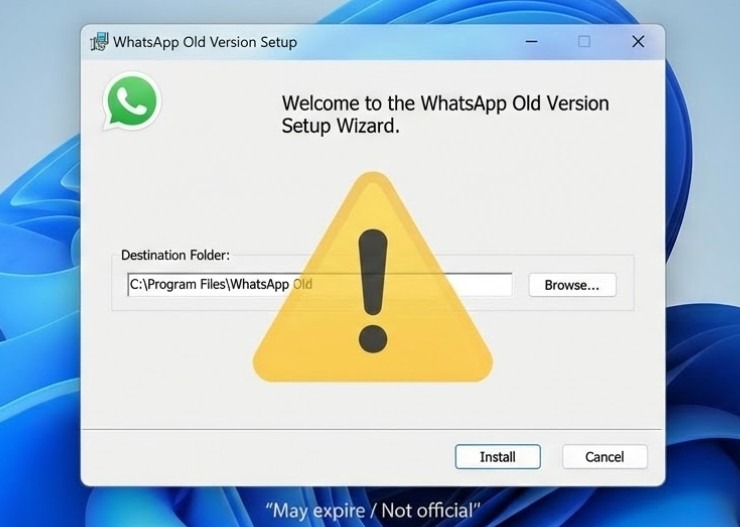
Can You Install the Old Version? You might find people online sharing links to download the old WhatsApp installer. Be careful with this. While it might work for a few days, these old versions usually have an “expiration date.” After a short time, the app will stop working and force you to update anyway. It is usually not worth the hassle.
The Best Alternative: Just Use Your Browser Since the new “app” is basically just a website anyway, you might be better off skipping the download completely. Many users suggest simply opening web.whatsapp.com in your web browser (like Chrome or Edge). It often runs faster than the desktop app, and you can just pin the tab so it is always open.
Leaving for Telegram or Signal or Arattai
This update has made many people angry enough to look for alternatives. The two biggest competitors mentioned are Telegram and Signal.
- Telegram: Users love it because it is incredibly fast, has great features, and the desktop app is excellent. It feels much smoother than the new WhatsApp.
- Signal: This is the top choice for people who care about privacy and security above everything else.
- Arattai: Some users in India are also considering regional alternatives like Arattai. It positions itself as a local messaging app with privacy-focused messaging and basic communication features. While it does not have the scale of WhatsApp or Telegram yet, the fact that people are even exploring smaller platforms shows how deep the dissatisfaction runs.
However, switching is not as simple as installing a new app. Most people stay on WhatsApp because their family, colleagues, and clients are there. Messaging apps are not just tools; they are networks. And leaving a network requires everyone else to move with you.
Until you can convince your entire circle to switch, you might be stuck dealing with the new, slower WhatsApp.
For businesses, creators, and community managers, the problem is even bigger. If you have already built a WhatsApp Group or Channel with hundreds or thousands of members, walking away means losing that audience overnight. That is why many people focus on growing their WhatsApp presence instead of abandoning it. Whether you are building a community or promoting your brand, increasing your WhatsApp group members or channel subscribers has become a strategy in itself.
Conclusion
The new WhatsApp update for Windows is a clear example of a company choosing what is easy for them over what is good for you. By moving to a “Web Wrapper,” Meta saved development time, but they gave Windows users a slower, clunkier experience.
Hopefully, Meta listens to the feedback and brings back a true native app. Until then, you might want to keep a browser tab open, or start convincing your friends to download Telegram.
What about you? Is your WhatsApp lagging, or did you get lucky with the old version? Let us know in the comments.
