

A new security feature has been added to make WhatsApp even safer, which earlier could have been exploited by a hacker by knowing victim’s phone number. This could have been done by diverting the SMS containing the OTP (One Time Password) sent on your number. Such complaints were registered and known to WhatsApp, therefore they came up with a solution i.e. Two step verification password feature (2SV) for Beta Version for Android only. This means that in order to reconfigure your WhatsApp account with Two-step verification, you need to have OTP plus a chosen 6-digit 2SV passcode.
The two-step verification can be enabled by the following steps:
- Tap on WhatsApp Settings, click to Account, a two-step verification feature will open.
- Select enable, and set a passcode of 6-digit, then reconfirm it.
- In the next step, you need to enter your Email ID, in case you need to recover your passcode in future. Though it’s optional, yet its recommended to add email as a back-up.
- When you have fulfilled all these points, you are through with the process.
- You are now ready to go with the re-configured and safer messaging via WhatsApp.
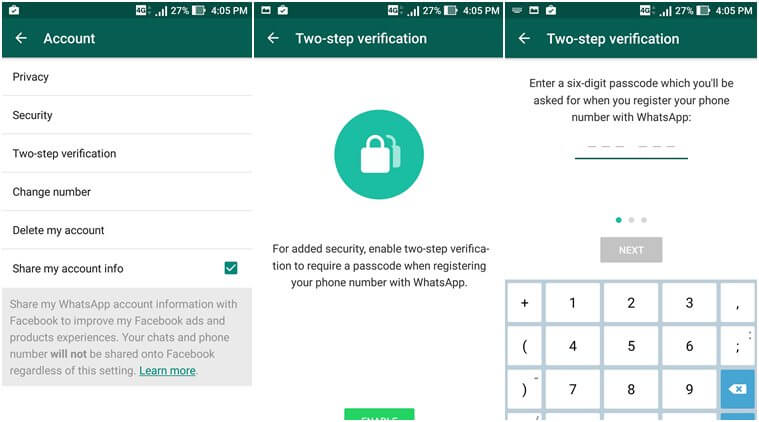
In case you wish to change your number next time on WhatsApp, you have two verification steps to go through with, this time WhatsApp won’t be lenient and verify your OTP instantly, rather you also need to put an effort and set a new 6-digit passcode along with that.
Email verification to assist user
According to WhatsApp, Email ID verification is not only to confirm the accuracy of the account. It’s a back-up option given to the users to unlock their account in case they forget it and unable to retrieve it back. Also it helps in keeping your account security intact, for instance if you get an email that asks you to disable the two-step verification and you haven’t sent any request for this, please note that you must not click on the link as this might be an hideous attempt by any unknown entity to verify your phone number. However, in a genuine case, when you have forgotten your set passcode after a month, you do not need to worry.
See also: Why Google Allo Is Better Than Whatsapp?
Do not panic, 2SV passcode is here to help:
To solve this keep-on-forgetting-passcode problem WhatsApp has a valid solution for it. In order to help you remember your 6 digit passcode, it will request you to enter it on definite time-intervals, and it’s not optional, to do it regularly is a compulsion or else you need to disable the 2SV feature. Currently, the feature is available only on the beta version of WhatsApp, but a stable version will soon be launched on both iOS and android devices, which comprises of 1 billion users approximately.
To register and start using 2SV enabled WhatsApp app, you need to be a beta tester, for which you can sign up and update WhatsApp to beta version 2.16.346 from Play store.
