

Close Menu
    Facebook X (Twitter) Instagram
    The SocioBlend BlogThe SocioBlend Blog
    • Social Media
    • Technology
    • Business
    • SEO
    • Content Marketing
    • Write for us
    The SocioBlend BlogThe SocioBlend Blog
    Home»Social Media»How to Upload Your Music on Audiomack (Simple Steps)
    Social Media

    How to Upload Your Music on Audiomack (Simple Steps)

    Mohit MaheshwariBy Mohit MaheshwariJuly 20, 2020Updated:October 24, 2023No Comments3 Mins Read
    How to Upload Your Music on Audiomack (Simple Steps)
    How to Upload Your Music on Audiomack (Simple Steps)
    Share
    Facebook Twitter LinkedIn Pinterest Tumblr WhatsApp

    Audiomack is a fast growing music streaming platform with it’s top users from the United States, China, Nigeria, United Kingdom and Ghana and many other countries. 

    Artists and normal users can upload their music for free and there is no charge for offline music playback. This makes Audiomack a hot music streaming and podcast platform for not just professional artists but also for new users.

    We have read, the first step is always the most difficult one, not in this case at least. Because uploading music on Audiomack is very simple and for those who find it difficult we are here going to show you a step by step process for uploading your music and also how you can delete a song/track on Audiomack.

    We are assuming that you have signed up on Audiomack. After you log in to your Audiomack profile, follow the below mentioned steps.

    Start uploading your music on Audiomack

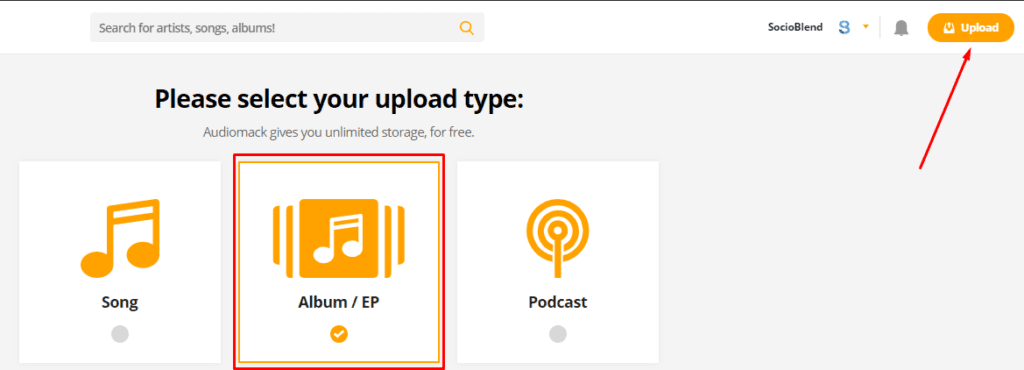
    1. Click ‘Upload‘ on the top right corner and select ‘Album‘ from the 3 options shown if it’s a song of an album. If it’s a single track without any album name, you can choose ‘Single’ or ‘Podcast‘ if you are uploading a podcast. (check the image below)
    upload type on audiomack 1

    (See also: Buy Audiomack Plays from Socioblend)

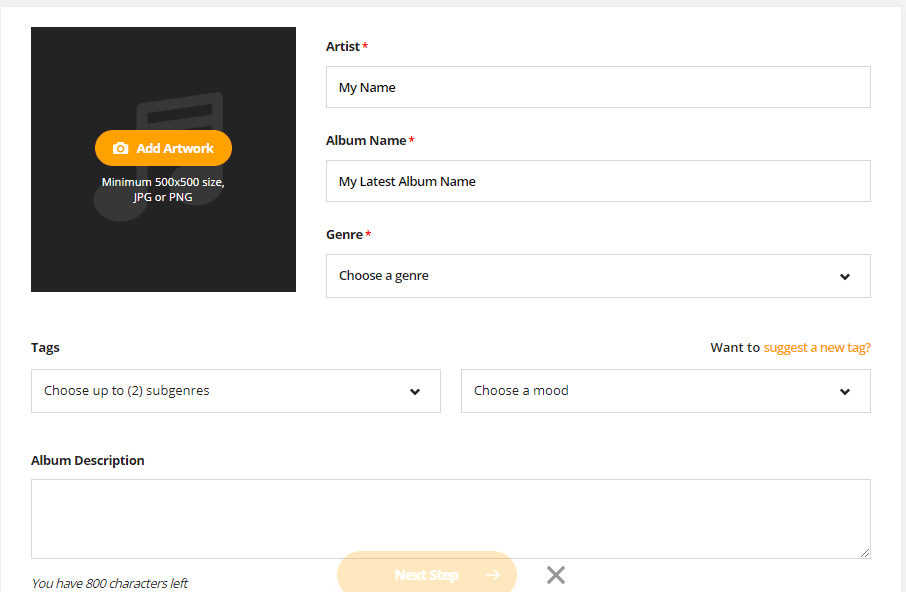
    2. Here you need to fill the details. Enter the name of the Artist, Album, Genre. Write tags, select mood, write few sentences about the song and an image for the album cover with minimum resolution of 500×500 pixels. (check the image below)
    album details to enter on Audiomack
    Enter song details

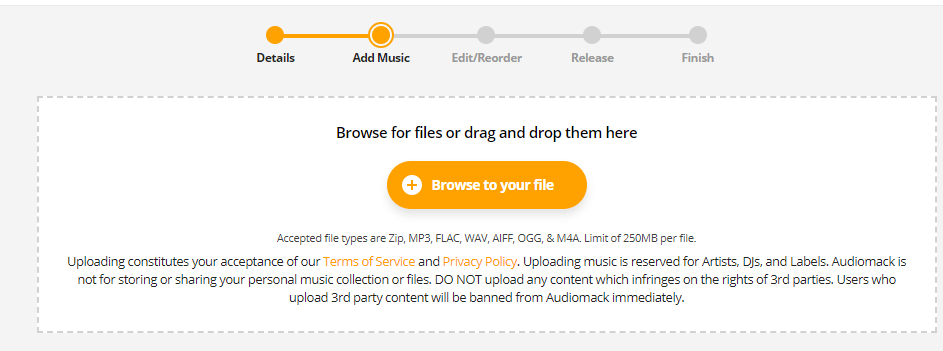
    3. This is an important step. Choose your track file and upload.
    select file and upload on audiomack
    Upload your music file

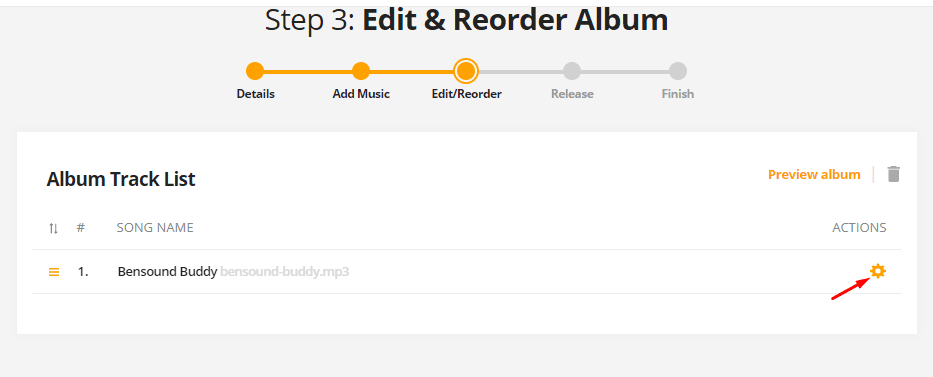
    4. In this step, you can add the name of the producer or featuring artist’s name. It’s completely optional.
    Edit album step 3

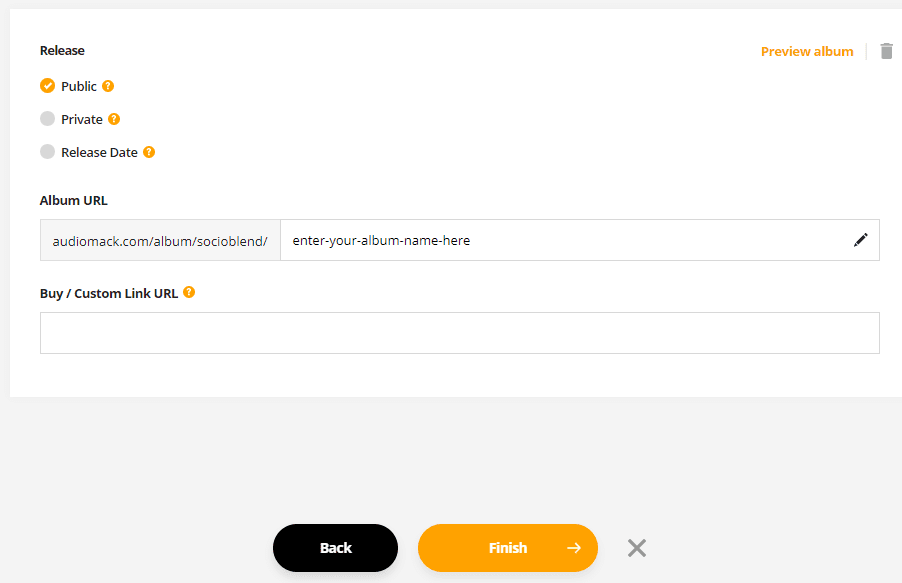
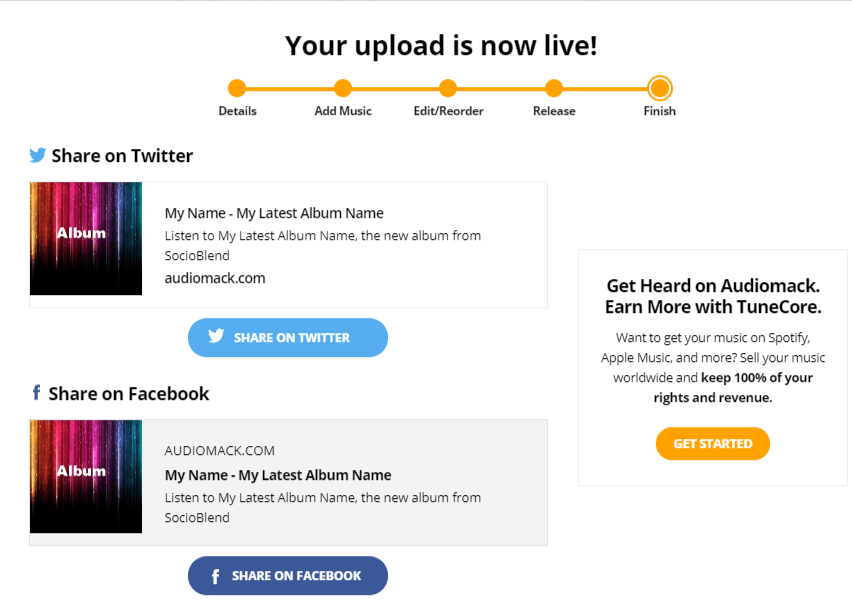
    5. Final step. If you want to publish it at the same moment, you can click on ‘Finish‘ or select ‘Release date’ and schedule it for future release date. (Check the screenshot below)
    Finish
    your music upload is successful on Audiomack

    Your music is successfully upload on Audiomack. But what if you want to delete a track mistakenly uploaded on your Audiomack? Follow the below steps to delete a song from Audiomack.

    How to delete a song/track from Audiomack

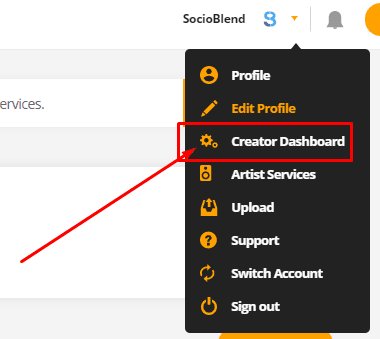
    1. From your profile select ‘Creator Dashboard‘ as shown in the image below.
    Creator Dashboard (Audiomack)
    Creator Dashboard

    2. From the left, select ‘Manage Content‘ as shown in the screenshot below.
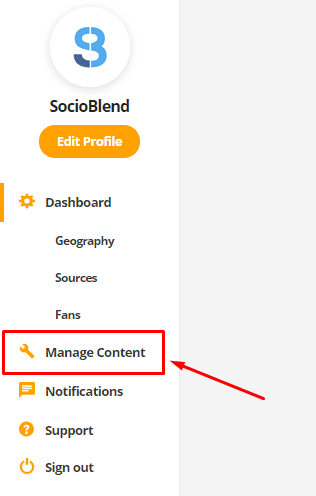
    manage content option in audiomack

    3. Delete the song. Click on the ‘settings‘ icon of the song which you want to delete.
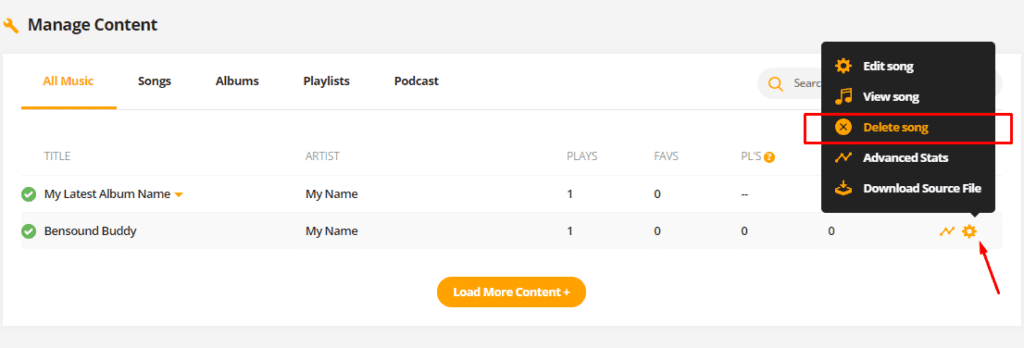
    delete song on audiomack
    Quick Access
    • Buy Spotify Followers
    • Buy Youtube Views
    • Buy Mixcloud Plays
    • Buy Reddit Upvotes
    • Buy Quora Upvotes
    • Buy Facebook Likes
    • Buy Twitch Viewers
    • Buy Soundcloud Plays
    audiomack audiomack music upload upload music upload music audiomack
    Mohit Maheshwari
    • Website
    • Facebook
    • X (Twitter)

    SEO Analyst and a part-time Content Writer.

    Related Posts

    15 Common RedNote Problems and How Foreign Users Can Fix Them

    January 18, 2026

    How to Use Snipping Tool on Windows & Mac (With Shortcuts + Tips)

    January 12, 2026

    Kick or Twitch: Who Accepts Silent Streamers?

    January 10, 2026

    What Is RedNote and What Global Companies Should Know About It

    January 3, 2026
    Recent Posts
    • Anna Kasprzak Net Worth: How an Olympic Rider Became a Billionaire January 20, 2026
    • 15 Common RedNote Problems and How Foreign Users Can Fix Them January 18, 2026
    • How to Use Snipping Tool on Windows & Mac (With Shortcuts + Tips) January 12, 2026
    • Kick or Twitch: Who Accepts Silent Streamers? January 10, 2026
    • What Is RedNote and What Global Companies Should Know About It January 3, 2026
    • What AI Content Breaks First on Sub-$50k Ecommerce Blogs January 1, 2026
    • Firefox Is Building an AI Kill Switch, and That Detail Matters More Than the AI Itself December 27, 2025
    Categories
    • Business
    • Content Marketing
    • News
    • SEO
    • Social Media
    • Technology
    • Twitter
    Social Media

    How To Grow Your Facebook Fan Page Likes Organically?

    By SocioBlendJanuary 27, 20160

    We now live in an era where the popularity of companies is being assessed by…

    How to Block Someone on LinkedIn?

    September 16, 2017

    Work Smarter, Not Harder: 10 AI Tools to Boost Your Productivity

    October 12, 2023

    6 Writing Tools to Enhance Your Content

    November 14, 2017
    The SocioBlend Blog
    Facebook X (Twitter) Instagram Pinterest Vimeo YouTube
    © 2026 SocioBlend. Developed by Jitendra Kumar Singh.

    Type above and press Enter to search. Press Esc to cancel.