
Close Menu
    Facebook X (Twitter) Instagram
    The SocioBlend BlogThe SocioBlend Blog
    • Social Media
    • Technology
    • Business
    • SEO
    • Content Marketing
    • Write for us
    The SocioBlend BlogThe SocioBlend Blog
    Home»Social Media»Learn How To Check If A YouTube Channel Is Monetized Or Not
    Social Media

    Learn How To Check If A YouTube Channel Is Monetized Or Not

    Rahul MaheshwariBy Rahul MaheshwariJanuary 19, 2023Updated:October 23, 2023No Comments2 Mins Read
    Learn How To Check If A YouTube Channel Is Monetized Or Not
    Share
    Facebook Twitter LinkedIn Pinterest Tumblr WhatsApp

    YouTube has evolved itself from a very clean video search engine to a platform which has a lot to offer in terms of features. Hence, it becomes even more harder to understand each and every feature that YouTube has to offer. 

    As YouTube places ads on videos even if the channel is not monetized in cases where the uploaded videos contain content to which the creator or the channel owner doesn’t have all the necessary, It becomes even more difficult to know if the channel is actually monetized or not. 

    How to check if a YouTube Channel is Monetized (when you are the owner of the channel)

    It’s easier when you are the one who runs the YouTube channel because you have all the access to the details which are limited to only creators. 

    1. Go to status and features section of your channel. You can click on the image icon present on the top right of your YouTube homepage to access this section on your channel. 
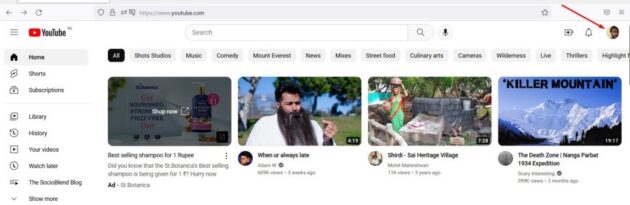
    Youtube sign in

    Related: 7 YouTube Alternative Platforms to Earn Money

    2. Click on YouTube Studio option and login. YouTube Studio is home for video content creators where you can find all the tools which let’s you check Video performance, Channel analytics, Etc.
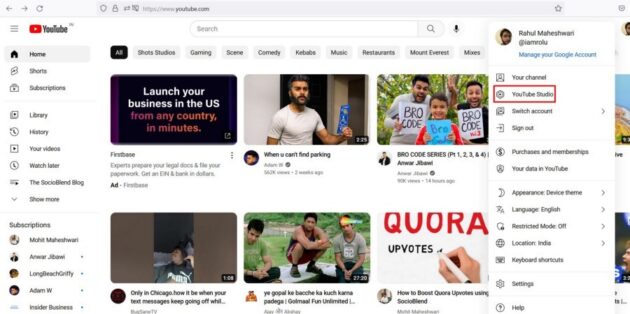
    Step 2: Go to Youtube studio

    3. In the left menu, Click on monetization option to view your status.
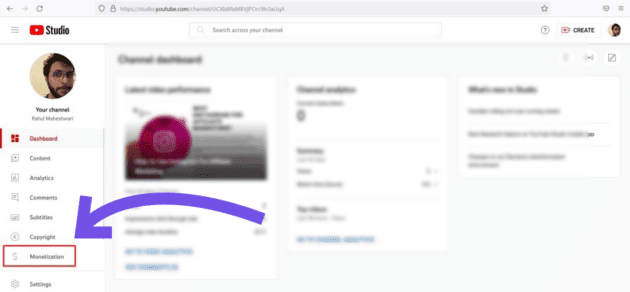
    monetization tab from Youtube studio
    Related: How to Run Shoppable Ads on YouTube Shorts

    How to check if a YouTube Channel is Monetized (when you are not the owner of the channel)

    Using these simple steps you can find out if a YouTube channel that is not owned by you is monetized with YouTube partner program or not.
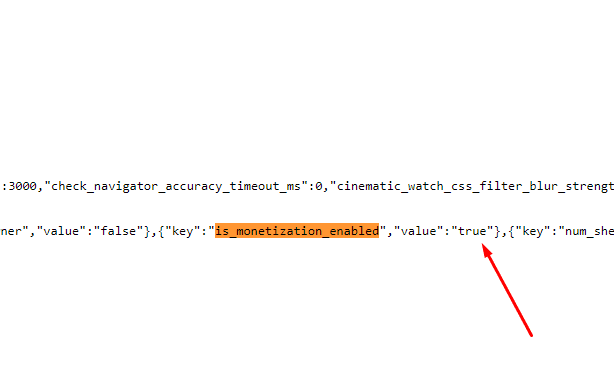
    youtube monetization true
    1. Go to the YouTube channel you want to know.
    2. Right click and tap on ‘view source’. View Source lets you view the HTML or XML source for the page you’re viewing.
    3. Press CTRL+F to search. Type ‘is_monetization_enabled’
    4. In that if it shows ‘Value’ is True, then it means the channel is monetized and if the ‘Value’ is False then it means the channel is not monetized.

    Quick Access

    • Buy Facebook Likes
    • Buy Spotify Followers
    • Buy Twitch Viewers
    • Buy Soundcloud Plays
    • Buy Quora Upvotes
    • Buy Telegram Members
    • Buy Reddit Upvotes
    • Buy Mixcloud Plays
    monetization check monetization status check Youtube channel monetization Youtube tips YouTube Tricks
    Rahul Maheshwari
    • Website

    Digital Marketer | Football Maniac | Value Investor | Petrol Head | Plantsman

    Related Posts

    The Anatomy of a Facebook Feed: Why Comments Win in 2026

    March 1, 2026

    How to See Who Shared Your Instagram Post – A Beginner’s Guide

    February 9, 2026

    How to Get More Comments on Facebook Posts (Advanced Strategies That Actually Work in 2026)

    February 5, 2026

    Anil Thadani Net Worth in 2026 (In Rupees & Dollars)

    February 4, 2026
    Recent Posts
    • The Anatomy of a Facebook Feed: Why Comments Win in 2026 March 1, 2026
    • Jack Dorsey Just Proved Growth Doesn’t Protect Jobs at Block February 27, 2026
    • Spotify Brings AI “Prompted Playlist” to Four New Premium Markets February 25, 2026
    • Dan Clancy Net Worth: Inside the Wealth and Vision of Twitch’s CEO February 23, 2026
    • How to Buy Backlinks Safely and Without Destroying Rankings February 20, 2026
    • Why Social Search is Replacing the Traditional Search Bar February 11, 2026
    • Why Most Salesforce Marketing Cloud Implementations Underperform February 10, 2026
    Categories
    • Business
    • Content Marketing
    • Entertainment
    • News
    • SEO
    • Social Media
    • Technology
    • Twitter
    Technology

    What Is Grok and How Does It Work?

    By Kanika AggarwalFebruary 6, 20240

    In rеcеnt timеs, technology has madе significant progress, and this has led to the rise…

    New Whatsapp Feature: Vacation Mode and DND for Chats

    October 20, 2018

    How to write Facebook posts that looks more Human

    January 27, 2016

    Explore the Top 5 WordPress Alternative Blogging Platforms

    March 17, 2024
    The SocioBlend Blog
    Facebook X (Twitter) Instagram Pinterest Vimeo YouTube
    © 2026 SocioBlend. Developed by Jitendra Kumar Singh.

    Type above and press Enter to search. Press Esc to cancel.