

Sometimes you just need to take a break from whatever is going on and relax. But taking a break is not just limited to getting a few days off from work, it often requires you to completely shut off from the social media noise. If you are active on Twitter, you’d know what I mean.
You can deactivate or completely delete Twitter if that’s what you wish. Without wasting time, let’s jump on to the topic right away.
How to Delete Your Twitter Account Using Your Phone
Open the Twitter app on your phone. Log in if not already logged in.
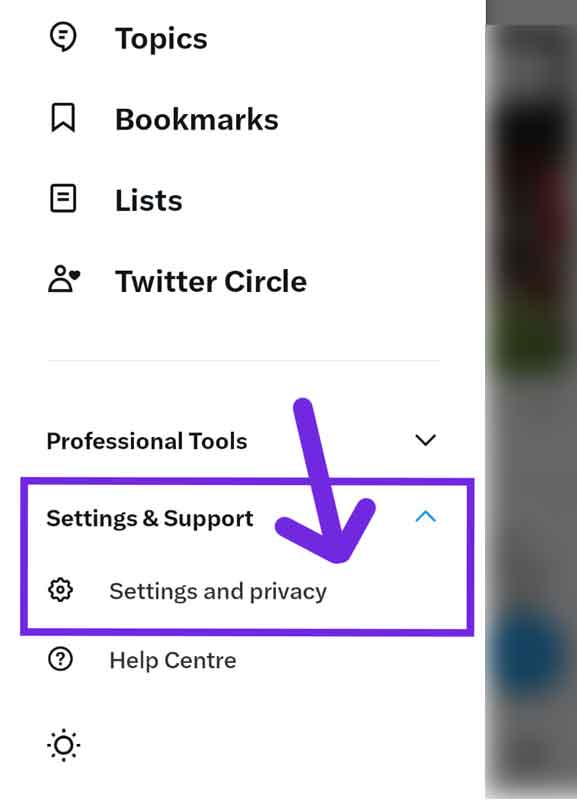
Click on your profile icon in the top right corner of the page and select “Settings and Privacy” from the drop down menu as shown in the image below.
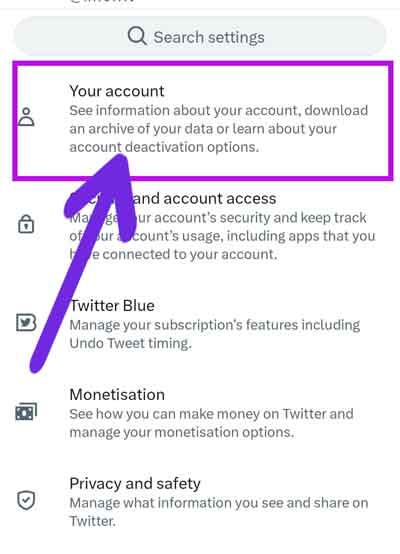
Click on “Account” from the options on the left-hand side of the page.
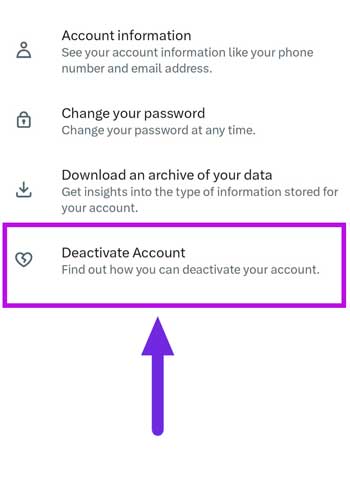
Scroll down to the bottom of the page and click on “Deactivate Account“.
Read the information on the next page and then click on “Deactivate“.
Enter your password to confirm that you want to deactivate your account.
Click on “Deactivate account” to complete the process.
And your Twitter account is now deactivated. You have 30 days until your account is completely deleted. Keep in mind that once you delete your Twitter account, your profile, tweets, and other information will be permanently deleted and cannot be recovered.
If the reason for deleting your X account is your low number of followers, then forget about this and buy X followers from a trusted brand.
Things you should know before deleting or deactivating your Twitter account
First of all, deactivating your Twitter account is not same as deleting it. But in order to delete your Twitter account permanently, you need to deactivate it first. Here are the important things that you should know before deleting/deactivating your Twitter account.
- To permanently delete your Twitter account you need to deactivate it first. You can’t delete your Twitter unless you deactivate it.
- Deactivating your Twitter account will start a 30 day cycle. In other words, it’s a cool off time given by Twitter for you to take a short break from Twitter. If you do not try to log in Twitter in this period, your account will be permanently wiped off and all data related to your account will be deleted and it’s irreversible.
- If you are deleting your Twitter account just to start another for a better username, then don’t. You can change your username and email for your existing account.
Deleting Twitter FAQs
I don’t remember the password, can I still delete my Twitter account?
No, password is required to delete or deactivate your Twitter account.
If I login in to my Twitter account after deactivating it, will it still delete my Twitter?
No, if you log in to Twitter in the next 30 days after you deactivate it, you will have to deactivate it once again and wait for 30 days to delete it.
I accidentally deactivated my Twitter account, is my Twitter account deleted?
Log in to your Twitter account, if you do it within the 30 days period (after deactivating it), you will be able to restore your Twitter account.
Can I restore my Twitter account if it’s deleted?
No, once your Twitter account is permanently deleted, the account can’t be restored.
