

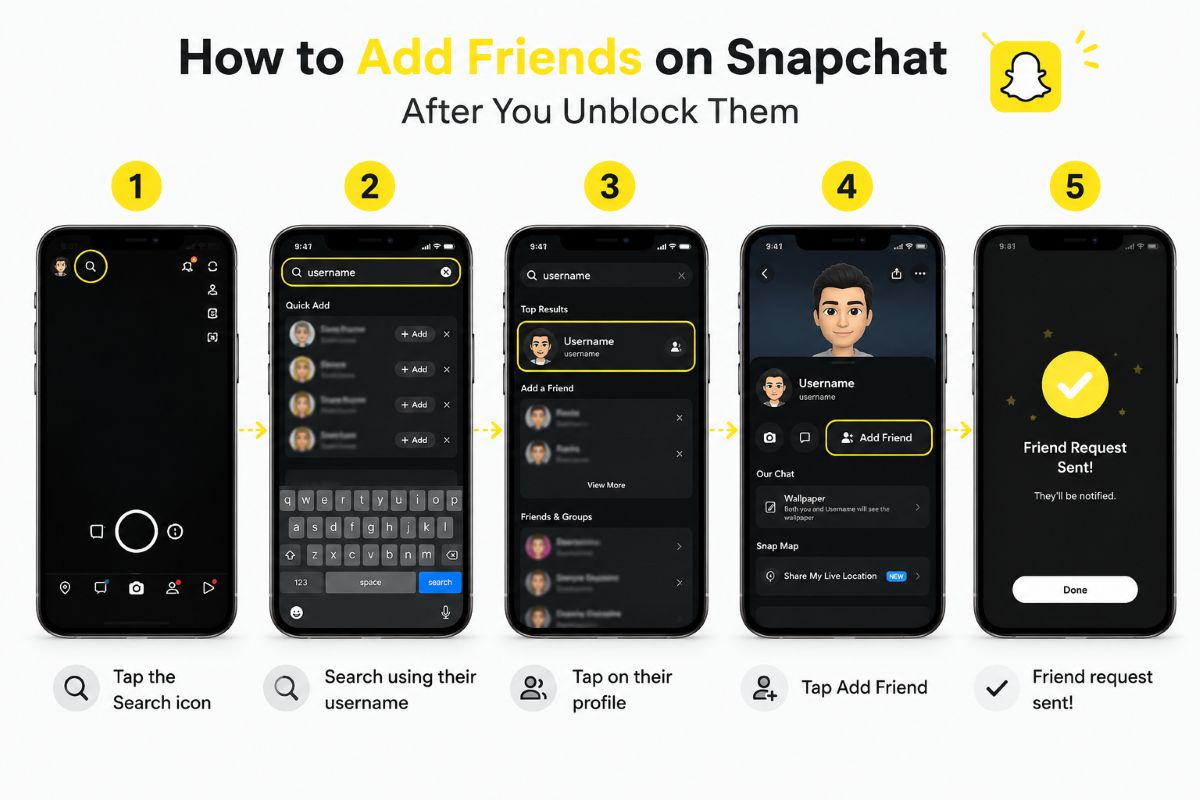
Unblocking someone on Snapchat is only part of the process. Many users expect everything to return to normal immediately, only to realize the person is still missing from their friends list.
That confusion usually comes from how Snapchat handles blocking and friendship status.
When you block someone, you are not simply muting notifications or hiding chats. Blocking is a stronger action that cuts off access between accounts. Because of that, unblocking does not always rebuild the previous connection automatically.
If you have already unblocked someone and are wondering how to add them back on Snapchat, here is what you need to know.
Still stuck at the previous step? If you have not removed the block yet, see our guide on how to unblock someone on Snapchat and what happens afterward before trying to re-add them.
Can You Add Someone Back on Snapchat After Unblocking Them?
Yes, you can add someone back after unblocking them on Snapchat.
However, whether you become friends again instantly depends on several things, including your privacy settings, their account settings, and whether Snapchat requires a new friend request.
This is where many people get tripped up.
Unblocking removes the restriction you placed on the account. It does not necessarily restore your old friendship status, chat permissions, or previous connection automatically.
Think of it this way.
Blocking closes the door completely. Unblocking unlocks the door again. You may still need to reopen communication by sending a friend request.
Also read: Snap Star Requirements, Perks And How To Apply
How to Add Someone on Snapchat After You Unblock Them
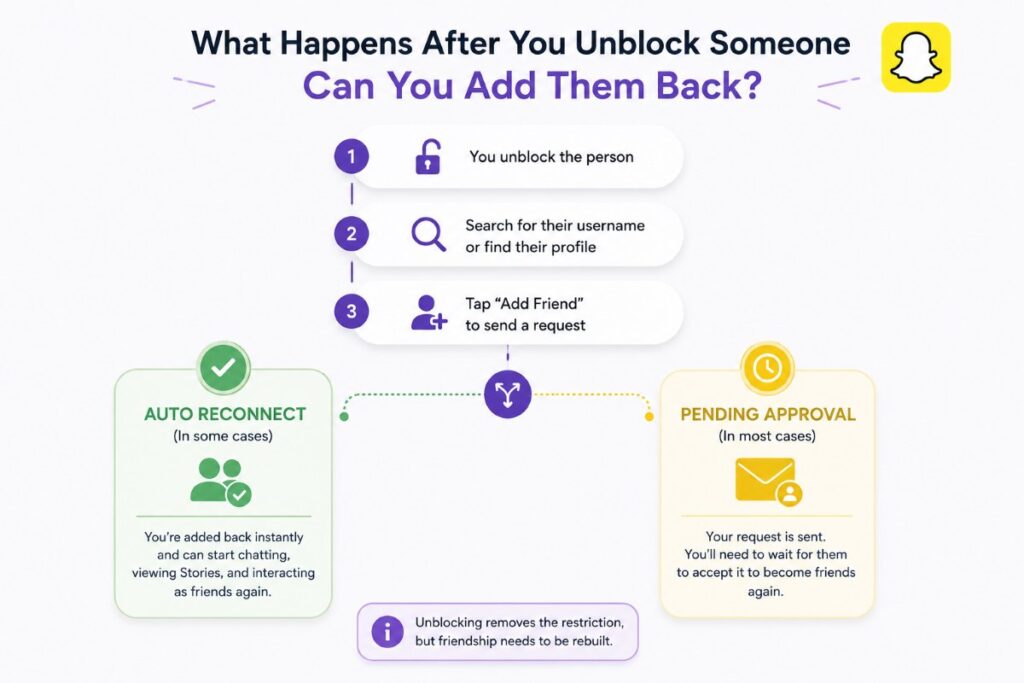
If you already unblocked the person, adding them back is usually straightforward.
Step 1: Open Snapchat and Go to Search
Launch Snapchat and tap the search icon at the top of the screen.
You can search using:
- Their Snapchat username
- Their display name
- Contacts sync, if their number is connected
Using the exact username tends to work best because display names can be duplicated.
Step 2: Find Their Profile
Once you locate their account, tap their profile.
You should see an Add Friend button if their account is available for you to add.
If you do not see that option, do not panic yet. There are a few reasons this can happen, and we will cover them shortly.
Step 3: Tap “Add Friend”
Tap Add Friend to send the request.
In many cases, that is all you need to do.
Depending on their privacy settings, one of two things usually happens:
- You reconnect immediately.
- Your request goes into a pending state until they accept.
This difference matters because not every Snapchat account allows open friend additions.
Some users limit who can contact them or add them back. Others require manual approval.
Do You Need Their Approval Again After Unblocking?
Sometimes yes.
Sometimes no.
The answer depends on how your friendship existed before the block and how the other person’s account settings work.
For example, if Snapchat treats the situation like a fresh connection request, the other person may need to accept you again before full interaction returns.
That means you might see signs like:
- “Pending” status
- Limited chat access
- Stories not appearing immediately
- Restricted interaction until approval
This can feel confusing if you were previously close friends on Snapchat.
But remember, blocking interrupts the relationship structure inside the app. Snapchat prioritizes user privacy and account control, which is why reconnecting may require another confirmation step.
Why You Might Not Be Able to Re-Add Someone on Snapchat
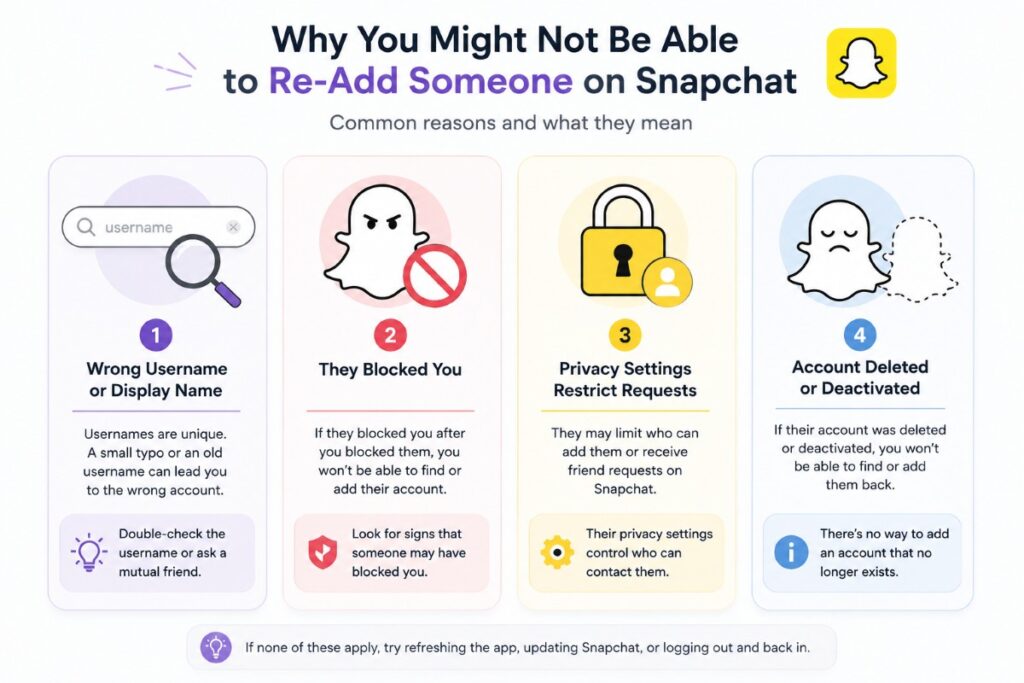
Sometimes users unblock someone and discover they still cannot find, add, or reconnect with them.
That does not always mean something is wrong with your app.
Several different situations can cause this.
They Changed Their Username
Snapchat usernames are important identifiers.
If you are searching using an old username, nickname, or display name, you might simply be looking for the wrong account.
Try checking:
- Shared screenshots
- Older saved conversations
- Mutual friends who know their current profile
Even small spelling differences can prevent the correct account from appearing.
They Blocked You
This possibility is uncomfortable, but it does happen.
If you blocked someone earlier, they may have responded by blocking you too.
In that situation, finding or adding their account becomes much harder.
This is one reason why people search for answers after unblocking someone and still seeing no results.
If you suspect this situation, you may want to check signs that indicate whether someone blocked you on Snapchat.
Their Privacy Settings Restrict Friend Requests
Snapchat gives users control over who can contact them, view their content, or interact with their account.
Some users tighten these settings after unwanted spam, harassment, or random requests.
Because of that, your request might not go through the way you expect.
Privacy controls are not glitches. They are intentional barriers designed to give users more control over who reaches them.
They Deleted Their Account
If the account disappeared entirely, deletion is another possibility.
An inactive or deleted account will obviously not respond to friend requests.
Although this is less common, it explains situations where an account suddenly becomes impossible to locate after unblocking.
What Happens After You Successfully Add Them Back?
Adding someone back does not always restore every part of your old Snapchat history.
This is another area where expectations and reality often differ.
Users sometimes assume re-adding will magically restore everything exactly as it was before the block.
That is not always how Snapchat behaves.
Depending on timing and account conditions, you may notice changes involving:
- Chat availability
- Saved conversations
- Story visibility
- Snap interactions
- Friendship status
Some content may return normally. Other things may remain affected by how the block occurred and what happened during the separation period.
This matters because Snapchat treats blocking as a significant privacy action, not a temporary pause button.
What If the “Add Friend” Button Does Not Appear?
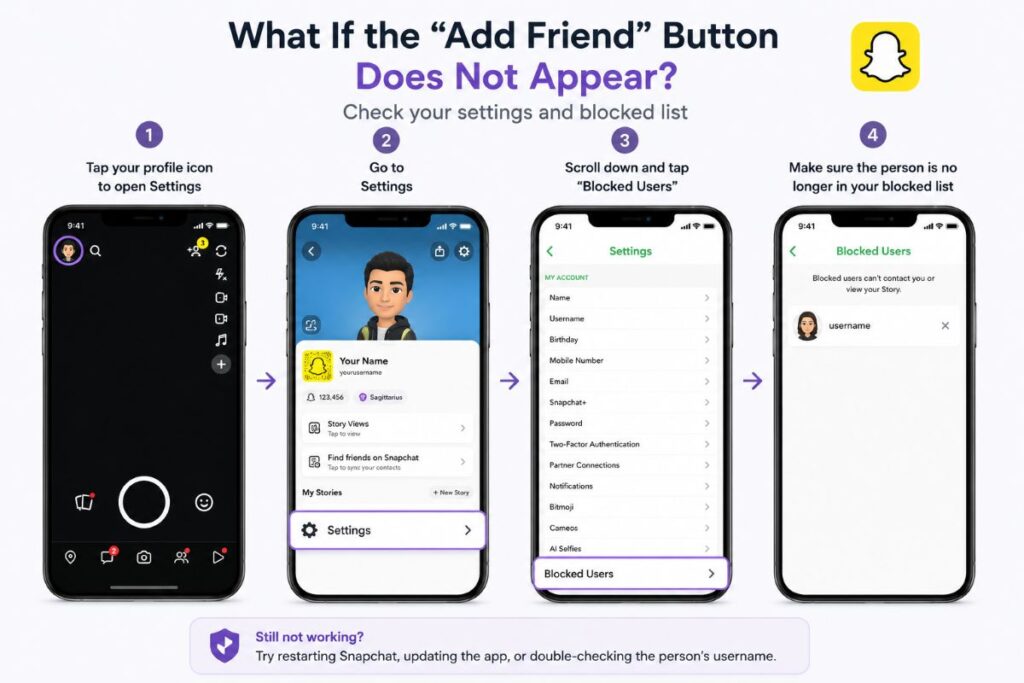
If you cannot see the Add Friend option after unblocking someone, work through a few quick checks before assuming the worst.
First, confirm that you actually completed the unblock process.
It sounds obvious, but many users accidentally leave the account inside their blocked list.
You can verify this by going into:
Settings → Blocked Users
If the account still appears there, the unblock did not finish.
Next, restart the app.
Snapchat occasionally delays profile refreshes, especially after account changes or privacy updates.
A quick restart can solve surprisingly simple problems.
If the issue continues, update Snapchat through your device’s app store. Older versions sometimes create strange behavior with searches, profiles, or friend management.
Finally, double-check the account information you are using.
Searching the wrong username is far more common than people realize.
Can You Message Someone Immediately After Re-Adding Them?
Not always.
Messaging permissions depend on your relationship status and the other person’s privacy preferences.
Some users allow messages from broader audiences. Others restrict communication to accepted friends only.
So even if you successfully send a friend request, you may not instantly regain full chat access.
This often explains why users think Snapchat is broken after reconnecting.
In reality, the platform is simply applying privacy rules.
If messaging matters more than just restoring the friend connection, wait until the request is accepted and the relationship status fully updates.
Common Questions About Re-Adding Someone After Unblocking
Does unblocking automatically add someone back?
Usually, no.
Unblocking removes the block itself. You may still need to manually search for the account and send a new friend request.
Will old chats come back after re-adding?
Results can vary.
Some conversations, saved messages, or interaction history may not behave exactly the way users expect after blocking and reconnecting.
Will they know I added them again?
In most cases, yes.
If you send a new friend request, the other person can typically see that interaction through Snapchat’s normal notification system.
Do streaks come back after you re-add someone?
Snapstreak recovery is a separate issue.
Re-adding someone does not automatically guarantee a previous streak will return.
A Simple Way to Think About Snapchat Re-Adding
If you are struggling to understand the process, this mental model helps.
Blocking is about restriction.
Unblocking removes that restriction.
Adding someone back rebuilds the connection.
These are related actions, but Snapchat treats them as separate steps.
That distinction explains why users often unblock someone successfully but still wonder why nothing changed afterward.
Summary
If you want to add friends on Snapchat after you unblock them, the process is usually simple: find their profile, tap Add Friend, and wait for the connection to update if approval is required.
The confusing part is not the button itself. It is understanding what unblocking actually does.
Unblocking does not always restore the previous friendship automatically because Snapchat separates blocking from active friend relationships. That design gives users more control over privacy, communication, and reconnecting.
So if someone is still missing from your Snapchat friends list after an unblock, it does not necessarily mean the app failed.
You may simply be one step away from rebuilding the connection.
