

LinkedIn had many apprehensions before introducing the Block feature. The company was requested numerous times to add this feature and finally, LinkedIn considered the request and adopted a feature to block or report unwanted users. And if a user applies this with another user, the latter one will not be able to access profile of the former one. In short, both will not remain connected as the connection has been broken. For instance, they cannot send messages to each other. According to the team of LinkedIn, there were so many requests to start blocking feature on LinkedIn and after a lot of discussions, the company concluded to introduce the feature. Although it was not a consideration due to the members request rather was the right thing to do.
See also: How to Grow a LinkedIn Group
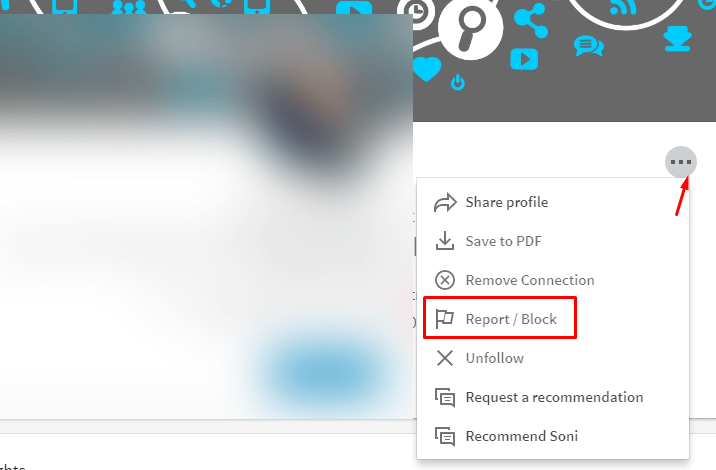
The blocking feature is accessible for the Premium users as well as normal users. Various tools are already available for them to use like to message few non-connections per month, free of cost. In addition, they do not get an alert when blocked any user. The process of blocking is very easy which is selecting the drop-down arrow at the right side of ‘send a message’ button, you will notice ‘block or report’ as one of the options.
Please note that the block feature will not eliminate you completely from the network, which means that the person can still view their public profile or any content others are sharing. Also, getting blocked doesn’t take away the right to edit information on your Public Profile by changing in settings.
See also: 5 New Features on LinkedIn That You Need to Know in 2017
When a mutual connection shares information from the blocked user, the update will still appear in the newsfeed. However, you can select those updates to hide from your timeline.
If you are an iPhone user, you need to follow these steps to block the user on LinkedIn:
- Download the LinkedIn App from App Store, open the app, go to your profile page. And if you are not logged In, then click on Sign-in, enter your details and submit to log-in.
- Go to the Search bar and type the person’s name whom you want to block from LinkedIn, most probably the name should appear (if the user exists on LinkedIn) on the window. Then you have to tap on the ‘…’ Button at the top right corner of the screen.
- One of the options would be ‘Report/Block’, select the option and it will ask you whether you want to block that particular user and also will tell you its consequence before you tap on ‘Block’. The warning would read: “You will no longer be connected (if you were before), or have endorsements and recommendations from this person. You will also no longer see any suggestions to interact with each other.”
- When you select ‘Block’ option, after reading the warning then it confirms your decision. As a result, the person will no longer be able to view your LinkedIn account/ profile.
The process to ‘Block’ someone LinkedIn can be followed on an android device as well, only the downloading would be done from Google Play store and rest of the steps would remain the same.
