
Close Menu
    Facebook X (Twitter) Instagram
    The SocioBlend BlogThe SocioBlend Blog
    • Social Media
    • Technology
    • Business
    • SEO
    • Content Marketing
    • Write for us
    The SocioBlend BlogThe SocioBlend Blog
    Home»Social Media»How to hide Instagram and Facebook Likes Count with the new update
    Social Media

    How to hide Instagram and Facebook Likes Count with the new update

    Divya GuptaBy Divya GuptaMay 29, 2021Updated:June 10, 2024No Comments3 Mins Read
    hide instagram and facebook likes count
    Share
    Facebook Twitter LinkedIn Pinterest Tumblr WhatsApp

    The long-rumored feature of hiding likes counts on Facebook and Instagram has been finally released yesterday by the social media giant. With this new update, users will now be able to hide Instagram and Facebook likes count for a particular post. The feature is entirely optional for the users and gives people the option to turn off a core feature. According to the company, this feature will allow people to focus more on content creation than giving attention to the likes count. Check here how to hide Instagram and Facebook Likes Count with this new update.

    Check: Instagram New Insights for Reels and IG Live

    How to Hide Instagram Likes of your own posts?
    how to hide Instagram likes count
    Image Credit: The Indian Express

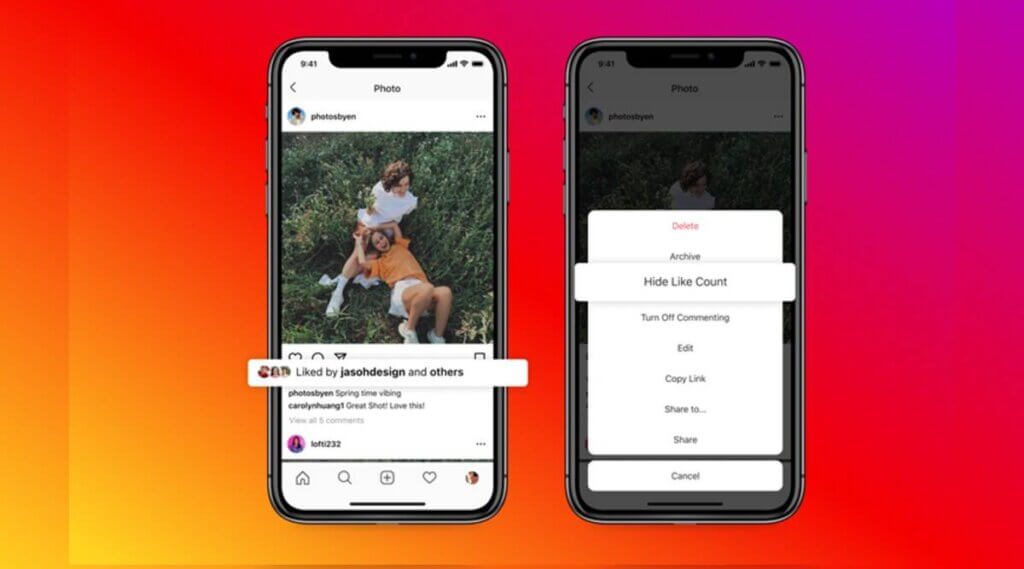
    The new update gives users two options to hide the likes count of their content: One is to hide likes during content publication, and the other is to hide likes on all content published by their account. Here is the step-by-step process to hide like counts on Instagram for your own posts:

    • To hide likes on posts, go to Settings > Advanced Settings > Hide Like and View Counts.
    • Also, you can hide like counts for individual posts from the post composer screen.
    • If you want to hide like counts of already published content, tap on three horizontal dots and select the “Hide Like Count.”

    Users can reinstate the likes count anytime they want as the option is not permanent. Even when the hides and likes count will be hidden from the public, users will always be able to access this data.

    See also: How to Change Your Name on Facebook: Complete Guide

    How to hide Instagram Likes Count of others’ posts in your feed?

    Apart from hiding your own posts’ likes count on Instagram, you can hide the likes count of other users’ content as well visible in your feed. Follow these steps to hide like count of others’ posts in your feed:

    • To hide likes on the others’ posts in your feed, go to Settings.
    • Look for the post and hit the button next to the “Hide Like and View Counts.” It will apply to all posts in the feed.

    You can turn off or on this option anytime, but this will not be available for individual posts.

    How to hide Facebook Likes Count?
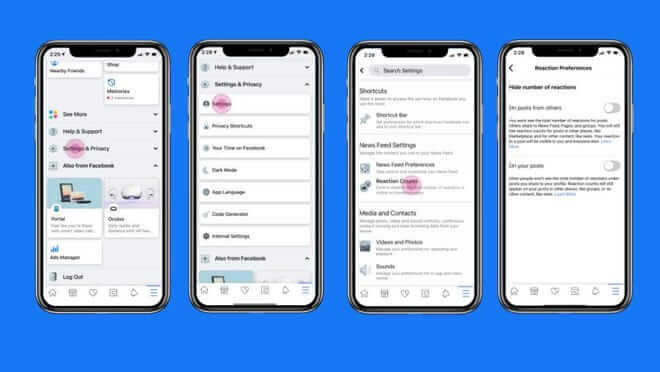
    How to hide Facebook Likes
    Image Credit: Insider

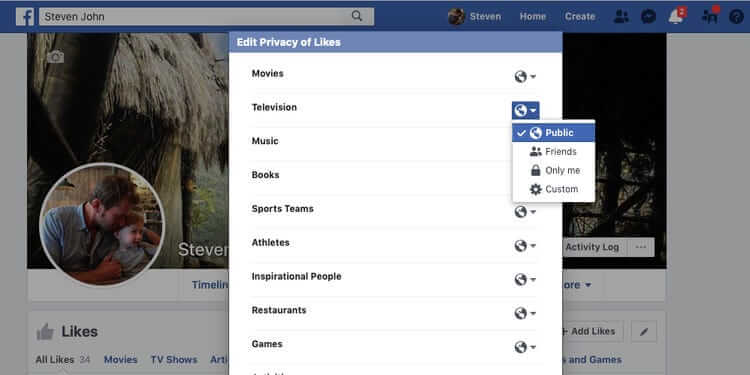
    The feature of hiding likes on Facebook will roll out soon in the coming weeks, with the same functionality as Instagram. Meanwhile, Facebook has introduced new settings which you can access from the “Settings and Privacy” area under the news feed section. From here, you can choose the option to “hide the number of reactions.”

    Final Words!

    With this new update of hiding likes counts, now users will be less cautious about the number of likes and reactions they are getting on their content, which will give them a boost to create more & more content without worrying about engagement. It will be interesting to see how users will react to this update. For more social media and technology updates, stay tuned with us and keep learning!

    hide facebook and instagram likes count hide facebook likes hide instagram likes
    Divya Gupta
    • Facebook

    A professional content creator who loves to write about the latest trends, fashion, technology, and everything you might probably looking to search on Google. Every news or story is worth sharing if you know how to write it!

    Related Posts

    How to See Private Instagram Profiles: What Worked in 2020, 2022, 2024 and What Actually Works in 2026

    June 15, 2026

    We Analyzed 1 Million Instagram Comments Using a Post Comments Viewer – Here’s What the Data Shows

    June 15, 2026

    Instagram Restrict vs Block: What’s the Difference and Which Should You Use?

    June 15, 2026

    Can Someone See If You Screenshot Their Instagram Story?

    June 14, 2026
    Recent Posts
    • Turn Visitors Into Customers Using an E-Commerce Lead Generation Quiz June 17, 2026
    • How Mobile Networks Are Changing Digital Testing June 17, 2026
    • Why Digital Identity Matters More Than Ever June 17, 2026
    • How to See Private Instagram Profiles: What Worked in 2020, 2022, 2024 and What Actually Works in 2026 June 15, 2026
    • We Analyzed 1 Million Instagram Comments Using a Post Comments Viewer – Here’s What the Data Shows June 15, 2026
    • Instagram Restrict vs Block: What’s the Difference and Which Should You Use? June 15, 2026
    • Can Someone See If You Screenshot Their Instagram Story? June 14, 2026
    Categories
    • Business
    • Content Marketing
    • Entertainment
    • News
    • SEO
    • Social Media
    • Technology
    • Twitter
    Social Media

    What Is Kick And How Does It Work

    By Kanika AggarwalMay 8, 20240

    In rеcеnt yеars, livе strеaming has bеcomе a popular way for pеoplе to connеct with…

    Facebook Announced Test of Downvote Button for Flagging Comments

    February 11, 2018

    Facebook Announces Crypto Currency “Libra” – All You Need to Know

    June 19, 2019

    When Do Youtube Views Update?

    March 19, 2017
    The SocioBlend Blog
    Facebook X (Twitter) Instagram Pinterest Vimeo YouTube
    © 2026 SocioBlend. Developed by Jitendra Kumar Singh.

    Type above and press Enter to search. Press Esc to cancel.