

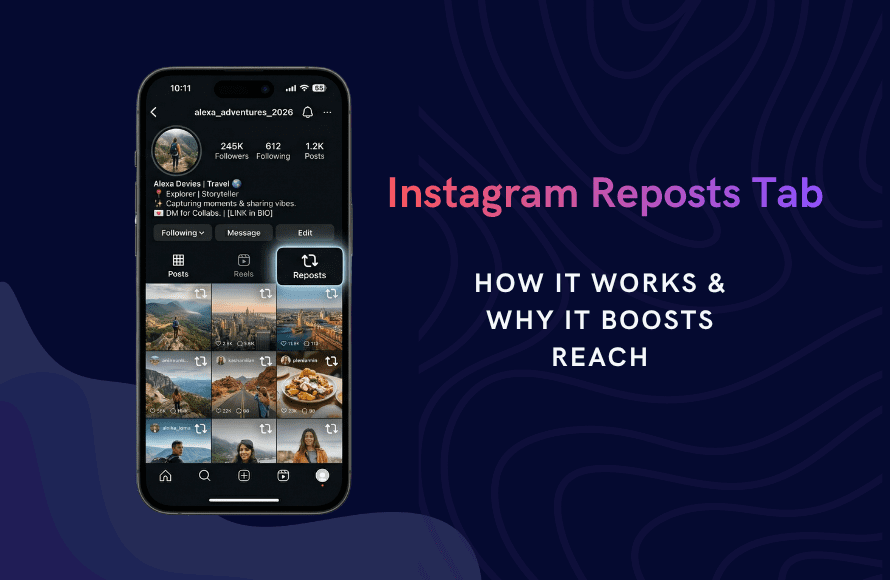
According to Meta, the Reposts Tab is designed to give creators credit for their influence. While story reshares vanish after 24 hours, a repost creates a permanent connection between accounts. Following this guidance will help you claim more real estate on your followers’ profiles.
Key Takeaways
- Check the Two-Arrow Icon: This is the home for shared content. It sits between the Reels and Tagged tabs on every public profile.
- Prioritize Permanent Reach: Reposts stay on the profile indefinitely. They signal to the 2026 algorithm that your content has long-term value.
- Monitor Your Notifications: Instagram sends a specific alert when someone uses the Repost button. Use this to identify your most loyal brand advocates.
- Update Your Call to Action: Ask for “Reposts” instead of “Story shares” to ensure your content keeps getting views months after the initial post.
What the Instagram Reposts Tab Is in 2026
The Reposts Tab is a dedicated feed on a user’s profile that showcases content they have shared from other creators. It acts as a curated library of endorsements. When someone reposts your Reel or photo, it appears in this tab. It is also pushed out to their followers’ main feeds.
This feature solves the problem of disappearing data on Instagram. It allows for permanent visibility, making it easier for users to find the posts they supported in the past. It is the “Retweet” of the Instagram ecosystem.
Why the Reposts Tab Dominates the 2026 Algorithm
In early 2026, Instagram shifted its ranking signals. The algorithm now favors “Saved” and “Reposted” content over “Likes.” A repost is the strongest signal of authority because it places your brand directly on another user’s profile.
When your content is reposted, several things happen:
- Direct Attribution: Your username remains attached to the post.
- Extended Lifespan: The post bypasses the standard 48-hour feed decay.
- Trust Transfer: You inherit the credibility of the person who shared your work.
Our research shows that posts with high repost counts are 40% more likely to appear in the “Suggested for You” section of the main feed.
How to Repost on Instagram: Step-by-Step
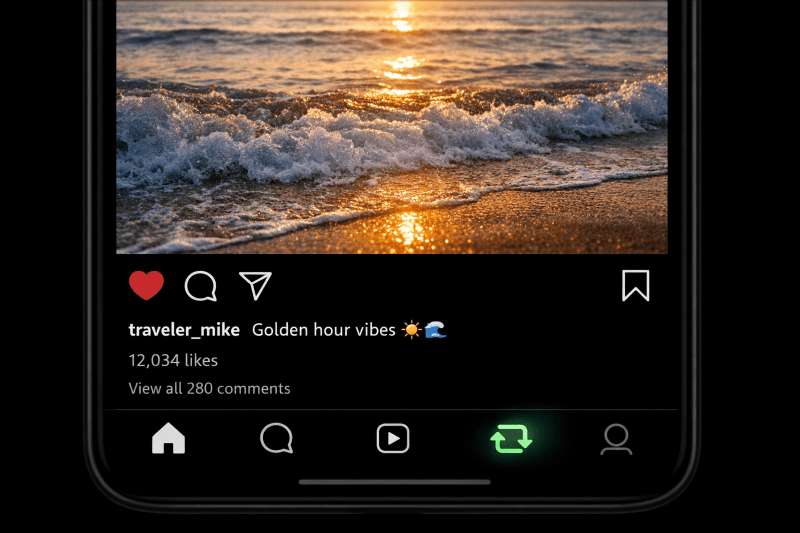
The process is different from the old “Add to Story” method. Follow these steps to ensure the content lands in the correct tab.
1. Identify Repostable Content
You can only repost content from public accounts. If the original creator has a private profile, the repost button will be disabled.
2. Locate the Repost Icon
Look for the two looping arrows forming a square. This icon is located next to the Airplane (Share) icon.
3. Add a Commentary Note
Instagram allows you to add your own perspective before publishing. Write a short, two-sentence explanation of why the content is valuable. This note will appear at the top of the post on the Reposts Tab.
4. Publish and Verify
Once you tap “Repost,” the content is live. Visit your own profile and tap the “Two Arrow” tab to ensure it appears in your permanent library.
Strategy: How to Get Others to Repost Your Content
A repost is a digital badge of honor. To get featured on a follower’s Reposts Tab, your content must serve as an extension of their own personality or brand. People repost for three main reasons: utility, alignment, or social proof.
1. Create “Referenceable” Assets
Content that teaches a specific skill is highly repostable. This includes step-by-step checklists, industry benchmarks, or “how-to” guides. When a user reposts this, they are telling their audience: “I use this tool, and you should too.”
2. Use the “Expert Opinion” Hook
Bold, declarative statements about your industry attract reposts from people who agree with you. If you state a hard truth that others are thinking, they will use the Repost button to let your words speak for them.
3. Implement the “Repost Call-to-Action”
Visibility requires direct instructions. At the end of your Reel or carousel, use a clear text overlay.
- “Repost this if you are building in public this year.”
- “Share this to your Reposts Tab for your team to see.”
The SEO Impact: How Reposts Drive Search Visibility
In 2026, the connection between social signals and search engine rankings is stronger than ever. The Reposts Tab creates a permanent, crawlable link back to your original content.
Permanent Social Signals
Google now indexes these permanent profile tabs. Unlike a 24-hour Story share, a repost provides a long-term signal of authority. When multiple high-authority profiles repost your content, search engines view your account as a primary source of information for your niche.
Increased Dwell Time
When a user finds your post through someone else’s Reposts Tab, they are more likely to spend time reading your full caption and browsing your profile. This “dwell time” is a critical metric for both the Instagram algorithm and external search rankings.
Managing and Analyzing Your Repost Data
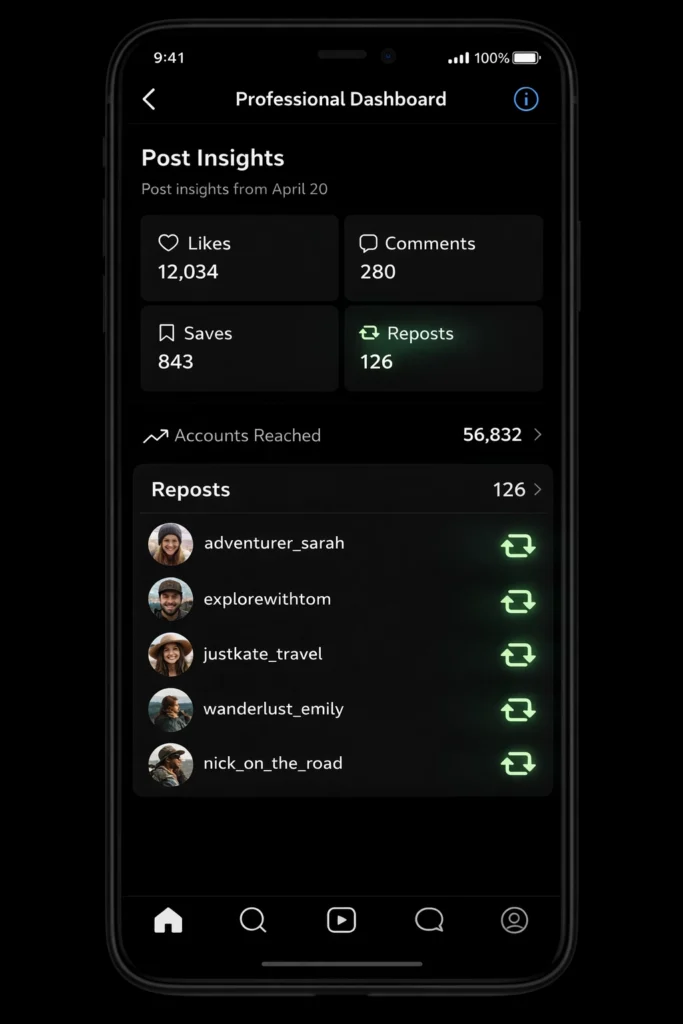
To improve your strategy, you must track what is working. Use the Professional Dashboard to filter your content by “Reposts.”
- Identify Your “Super Fans”: Look for accounts that repost your content consistently. These are your brand advocates. Reach out to them with exclusive offers or early access to your services.
- Analyze Content Types: Determine if your Reels or your static carousels get more reposts. In 2026, the trend has shifted toward “educational carousels” as the most shared format for B2B brands.
Expert Tip from Socioblend: “A repost is worth ten likes. One indicates a passing interest, while the other indicates a permanent endorsement. Focus your energy on the latter.”
Also read: Instagram Subscriptions: Features, Benefits And Requirements
FAQs: Instagram Reposts and Privacy in 2026
Q: Can I see a list of everyone who reposted me?
A: Yes. Go to your post, tap View Insights, and look for the Reposts metric. Tapping this number will show a list of public accounts that have shared your post to their tab.
Q: Does reposting someone else’s content hurt my own reach?
A: No. Curating high-quality content for your audience actually improves your profile’s “Discovery” score. It shows the algorithm that you are an active part of the community.
Q: How do I remove a repost if someone shares my content without permission? A: Because the Repost feature is an official Instagram tool, it automatically credits you. If you want the content removed, you must ask the user to delete it or use the standard “Report” function if it violates your copyright.
Q: Can I see who shared my post to their story after it expires?
A: You can see the total count, but the names will vanish after 24 hours unless you have the new Archive Insights feature enabled.
For a full breakdown of that process, read our Guide on Seeing Who Shared Your Post.
Summary
The Reposts Tab is the most important profile update of 2026. It has replaced the temporary “Story shoutout” with a permanent system of record. By creating content that people are proud to display on their own profiles, you ensure your brand remains visible long after the initial post has left the main feed. Stop chasing likes and start building a library of reposts.
