

To make your Twitter account private and restrict access to your Tweets and profile, you can follow these steps:
Sign in to your Twitter account.
Once logged in, click on your profile picture located at the top-left corner of the screen. A drop-down menu will appear.
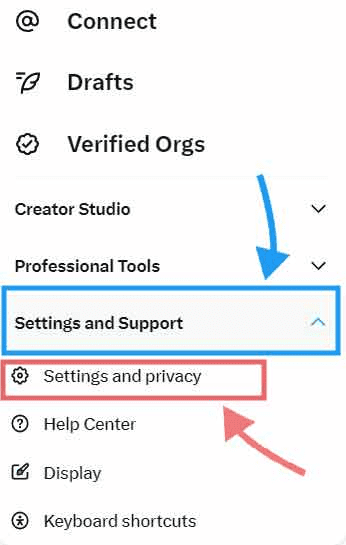
From the menu, select “Settings and Support”, if you are using it from a PC, you can see the “More” option on the bottom-left of your screen. From the drop-down menu option, select “Settings and privacy”.
On the left-hand side of the page, click on “Privacy and safety”
In the Privacy section, you’ll see an option titled “Audience and tagging”, click on it and you will see the “Protect your Tweets” option. Tick the box for this option and all of your Tweets will be visible only to people who follow you.
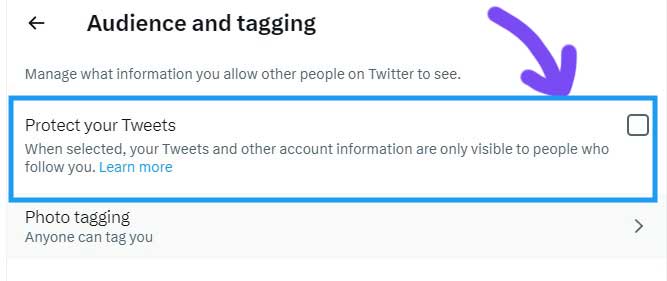
Once you’ve enabled the privacy setting, your Tweets will only be visible to your approved followers. Any new follower requests will require your approval before they can view your Tweets.
Additionally, you can also manage and review your follower requests by going to the “Privacy and safety” section and selecting “Followers“.
Please note that making your Twitter account private means that only your approved followers can see your Tweets. People who aren’t following you won’t be able to view your Tweets, and your Tweets will no longer be visible in public search results or on your public profile page.
How to Stop People from Tagging You on Twitter
Sign in to your Twitter profile first. Click on your profile picture or “More” option depending on the device you are using.
Go to Settings and Support > Settings and privacy > Privacy and safety > Audience and tagging > Photo tagging.
There are 2 options shown here as shown in the screenshot below.
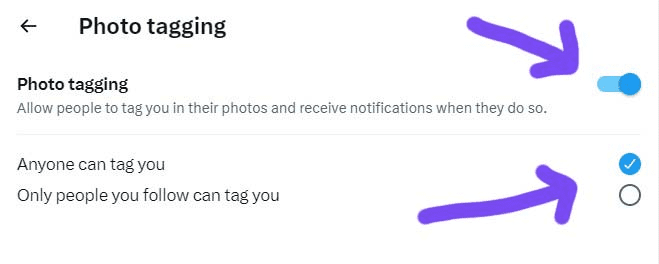
- Allow people to tag you in their Tweets.
If you deselect this option, you can completely disable the tagging option for your Twitter profile and no one will be able to tag you in their Tweets. - Anyone can tag you or Only people you follow can tag you.
By default, “Anyone can tag you” option is selected. If you select the other option, only people you follow will be able to tag you.
|See also: Buy X Followers and Likes
How to Stop People from Finding You on Twitter
If you want to stay hidden on Twitter and do not want anyone to find you, may be from your old college or school mates that you never got along. There is an option in which you can limit your discoverability on Twitter. But this is limited to stopping people to find you who have your email address or your phone number.
Go to Settings and Support > Settings and privacy > Privacy and safety > Discoverability and contacts.
As show in the screenshot below, there are 2 options.
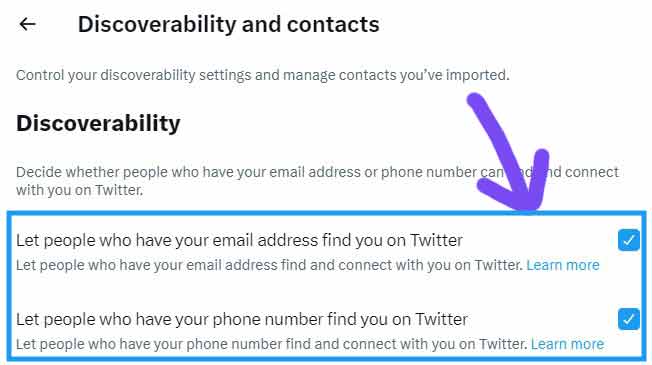
Option 1: Let people who have your email address to find you on Twitter
Option 2: Let people who have your phone number to find you on Twitter
Uncheck both options stop people from finding you using your email or phone number.
That’s it, now you have learnt to hide your Twitter profile, disable tagging on Twitter and to make your Tweets private.
