Close Menu
    Facebook X (Twitter) Instagram
    The SocioBlend BlogThe SocioBlend Blog
    • Social Media
    • Technology
    • Business
    • SEO
    • Content Marketing
    • Write for us
    The SocioBlend BlogThe SocioBlend Blog
    Home»Social Media»How to View or Hide Sensitive Content on X
    Social Media

    How to View or Hide Sensitive Content on X

    Mohit MaheshwariBy Mohit MaheshwariFebruary 9, 2024No Comments2 Mins Read
    How to View or Hide Sensitive Content on X
    Share
    Facebook Twitter LinkedIn Pinterest Tumblr WhatsApp

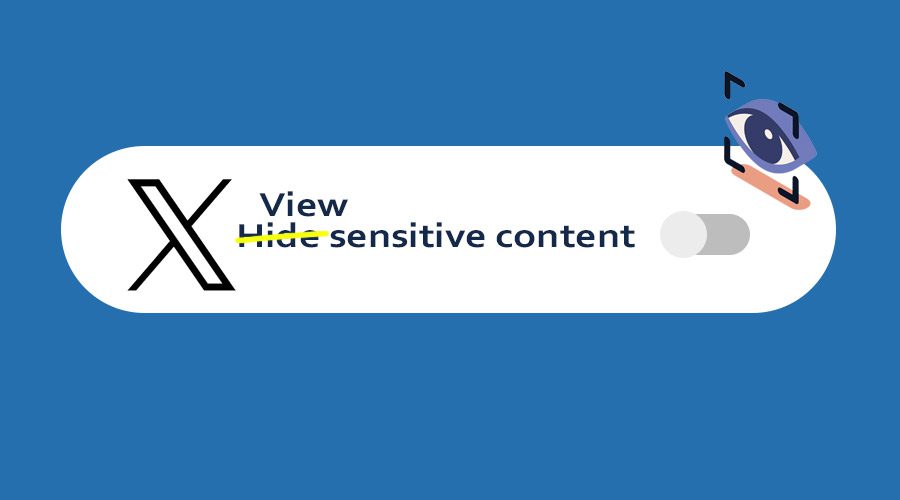
    X – the bustling hub of real-time updates, quirky memes, and heated debates. It’s a platform where news breaks faster than the speed of light and where every hashtag tells a story. In the midst of this dynamic platform, you might encounter content that’s a tad too sensitive for your taste. But fear not, as we’re here to unravel the mystery of handling such delicate material. Whether you’re eager to explore or prefer to shield your eyes, we’ve got you covered on how to view or hide sensitive content on X effectively.

    Here is how you can see or hide sensitive content on X

    1. Log in to your X app and click on your profile picture

      X profile click
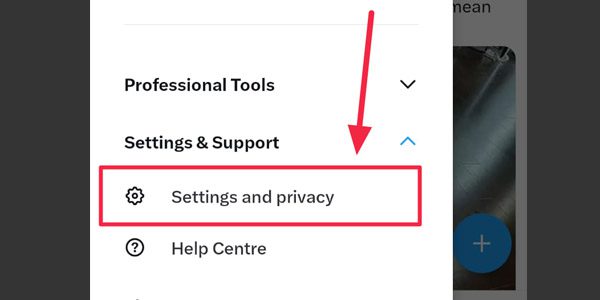
    2. Scroll down a bit, under ‘Settings & Support’ tap on ‘Settings and Privacy’ option. (screenshot below)

      Settings-and-Privacy-X app
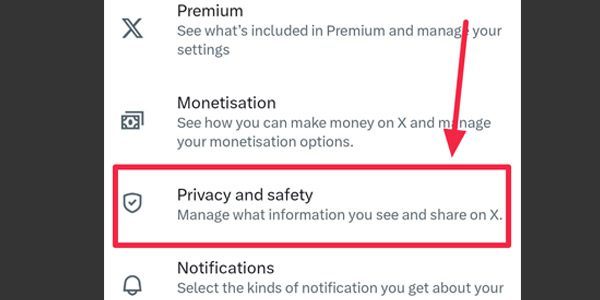
    3. Now select ‘Privacy and safety’ as shown in the below screenshot.

      Privacy-and-Safety - X app
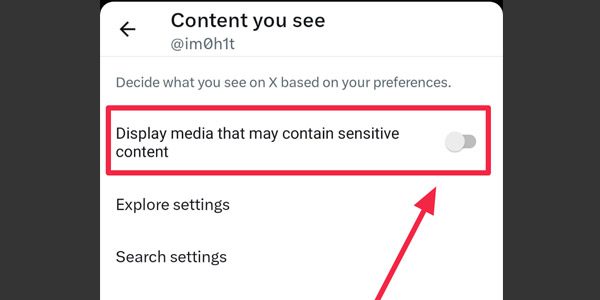
    4. Now you can see a toggle button for ‘Display media that may contain sensitive content’, if you want to hide sensitive content on your X feed, switch toggle off. If you want to see sensitive content then switch this toggle on.

      Tap on the ‘Search settings’ option to view more options to see or hide sensitive content in your searches on X app.

      Toggle-button-for-display-media-that-may-contain-sensitive-content
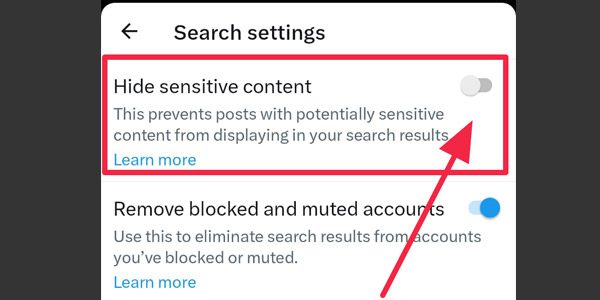
    5. Toggle off ‘Hide sensitive content’ if you do not want to see sensitive content when you search for something on your X app or, if you want to see sensitive search results, switch this on.

      Hide-sensitive-content-on-X-app.

    That’s it. In only 5 simple steps now you can view or hide sensitive content on your X app. Changes you make on your X smartphone app will also be applied to desktop version of X.

    You can check our other article on deleting mass tweets for free or you can also visit our page to buy X followers for quick social media growth.

    If you have any suggestions to improve this article, kindly comment in the section below.

    hide sensitive content Twitter View sensitive content X X app
    Mohit Maheshwari
    • Website
    • Facebook
    • X (Twitter)

    SEO Analyst and a part-time Content Writer.

    Related Posts

    I Posted on Lemon8 for 30 Days: Growth, Reach, and What Actually Works

    March 15, 2026

    What Is Audiomack Plus? Features, Pricing, Free Trial & Is It Worth It

    March 9, 2026

    How to See Who Viewed Your Facebook Profile: Beginner-Friendly Guide

    March 7, 2026

    What Happens When You Block Someone on Snapchat

    March 5, 2026
    Recent Posts
    • I Posted on Lemon8 for 30 Days: Growth, Reach, and What Actually Works March 15, 2026
    • What Is Audiomack Plus? Features, Pricing, Free Trial & Is It Worth It March 9, 2026
    • How to Index Backlinks Faster: 7 Proven Methods That Actually Work March 9, 2026
    • How to See Who Viewed Your Facebook Profile: Beginner-Friendly Guide March 7, 2026
    • What Happens When You Block Someone on Snapchat March 5, 2026
    • Is Stack Overflow Dead? The Slow Assassination by AI March 4, 2026
    • The Anatomy of a Facebook Feed: Why Comments Win in 2026 March 1, 2026
    Categories
    • Business
    • Content Marketing
    • Entertainment
    • News
    • SEO
    • Social Media
    • Technology
    • Twitter
    Social Media

    How to Block Someone on LinkedIn?

    By Mini JainSeptember 16, 20170

    LinkedIn had many apprehensions before introducing the Block feature. The company was requested numerous times…

    Instagram Auto-Caption Stickers are now Available in the Stories: How to Use Them

    May 5, 2021

    Twitter restarts Blue Badge Verification for Certain Categories: Check here

    May 22, 2021

    How to Use Pinterest for Business?

    September 3, 2017
    The SocioBlend Blog
    Facebook X (Twitter) Instagram Pinterest Vimeo YouTube
    © 2026 SocioBlend. Developed by Jitendra Kumar Singh.

    Type above and press Enter to search. Press Esc to cancel.