

Close Menu
    Facebook X (Twitter) Instagram
    The SocioBlend BlogThe SocioBlend Blog
    • Social Media
    • Technology
    • Business
    • SEO
    • Content Marketing
    • Write for us
    The SocioBlend BlogThe SocioBlend Blog
    Home»Social Media»How to Use Discord on PS5 with Voice Chat
    Social Media

    How to Use Discord on PS5 with Voice Chat

    Mohit MaheshwariBy Mohit MaheshwariMarch 11, 2023No Comments2 Mins Read
    How to Link Your Discord to PS5
    How to Link Your Discord to PS5
    Share
    Facebook Twitter LinkedIn Pinterest Tumblr WhatsApp

    The wait is finally over! Discord for PS5 is now available, which means you can chat with your buddies while gaming on your console. We know, we know, it’s like Christmas morning all over again.

    Discord has always been a godsend for gamers, but until now, it was only available on PCs. But fear not, console warriors, because it’s now available on PS5. So, grab your popcorn, sit back, and let us show you how to use it.

    How to Link Your Discord to PS5

    Step 1: Go to user settings on Discord. Click on “Connections” and from that, click on the PS5 logo from the options (see the image below).
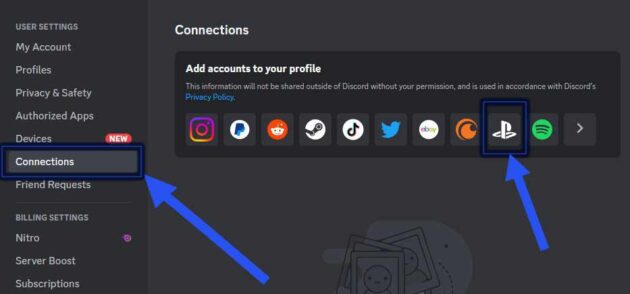
    Connect Discord to PS5
    Step 1: Connect Discord to PS5

    See also: How to Increase Discord Server Member Limit

    Step 2: Log in to your Playstation account, agree and accept the terms.
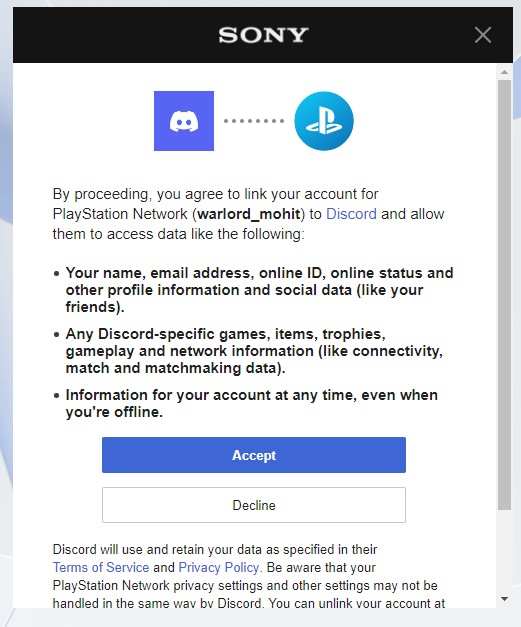
    Connecting Discord to your PS5
    Connecting Discord to your PS5

    If the linking is successful, you can see your Playstation username appearing here.

    That’s it, you have linked your Playstation account to your Discord.
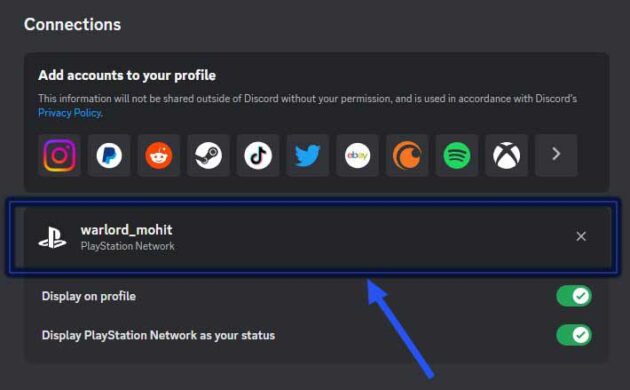
    Linking PS5 to Discord
    Linking PS5 to Discord

    See also: Discord Engagement Ideas for 2023

    How to Use Discord Voice Chat on PS5

    After successfully linking your Discord and PlayStation accounts, it’s time to level up your gaming experience by voice chatting with your Discord friends on your PS5.
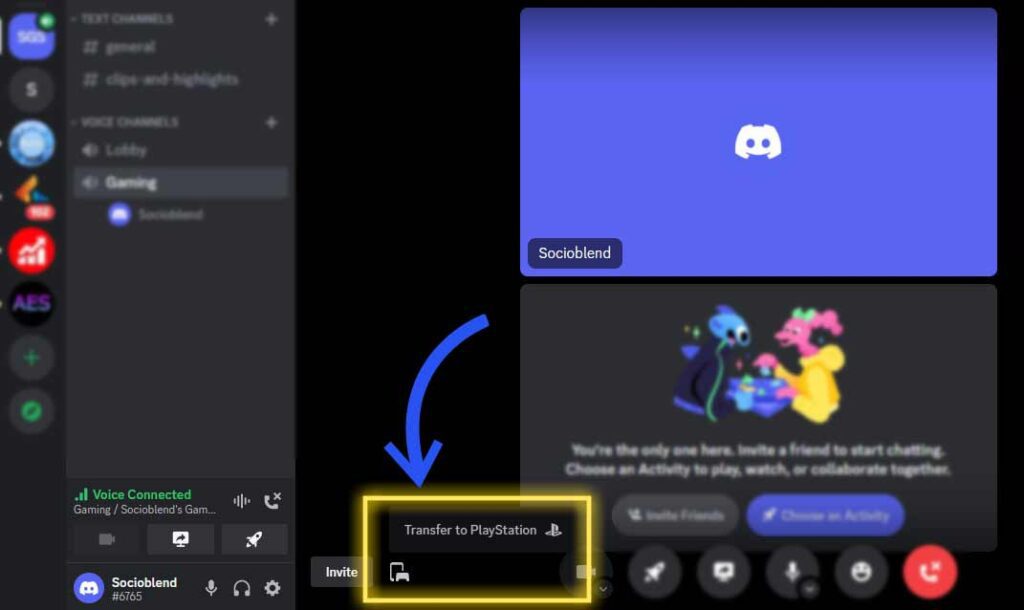
    voice chat from discord to PS5

    Here is how you can enable voice chat for PS5 on Discord. On mobile device, simply slide up the Voice controls and you’ll notice a new button labeled “Join on PlayStation.” Meanwhile, on desktop, you’ll see a button that resembles a phone and a game controller side by side. Afterward, you’ll be prompted to select the console where you want your Voice conversation to be transferred. Your conversation will be automatically and smoothly transferred to your PS5 console.

    Once on console, your controls will be exactly same as Discord.

    connect Discord PS5 Discord PS5 PS5 Use Discord PS5 Voice chat Discord
    Mohit Maheshwari
    • Website
    • Facebook
    • X (Twitter)

    SEO Analyst and a part-time Content Writer.

    Related Posts

    Why Google Finds Your Page But Refuses to Index It

    June 4, 2026

    How to Add Friends on Snapchat After You Unblock Them

    June 2, 2026

    Instagram Instants Explained: What It Is, How It Works, and Why Creators Should Care

    May 18, 2026

    How to Schedule Instagram Reels, Stories & Posts Automatically 

    May 16, 2026
    Recent Posts
    • 5 Helpful Marketing Tips for Expanding Business Growth June 5, 2026
    • Why Google Finds Your Page But Refuses to Index It June 4, 2026
    • How to Add Friends on Snapchat After You Unblock Them June 2, 2026
    • How to Identify Free Trial Offers on Company Websites May 30, 2026
    • How to Make a Minecraft Server for Free: 5 Methods Tested May 28, 2026
    • The First 24 Hours After Installing a Phone Tracker App: What Actually Matters May 26, 2026
    • Heart Health in High-Stress Agency Environments: Why Marketers Need to Unplug May 26, 2026
    Categories
    • Business
    • Content Marketing
    • Entertainment
    • News
    • SEO
    • Social Media
    • Technology
    • Twitter
    Technology

    Ramit Sethi Net Worth: Financial Educator Becoming a Millionaire

    By Mohit MaheshwariApril 14, 20240

    Ramit Sethi is an American financial educator and entrepreneur born to Indian immigrant parents, Prabhjot…

    10 Things About Telegram That You Must Know

    August 25, 2018

    Assembling a Cohesive Fundraising Identity Without a Custom Illustration Budget

    April 20, 2026

    5 Cool Features on Instagram That Doesn’t Exist in Other Apps

    February 22, 2018
    The SocioBlend Blog
    Facebook X (Twitter) Instagram Pinterest Vimeo YouTube
    © 2026 SocioBlend. Developed by Jitendra Kumar Singh.

    Type above and press Enter to search. Press Esc to cancel.