

Close Menu
    Facebook X (Twitter) Instagram
    The SocioBlend BlogThe SocioBlend Blog
    • Social Media
    • Technology
    • Business
    • SEO
    • Content Marketing
    • Write for us
    The SocioBlend BlogThe SocioBlend Blog
    Home»Social Media»Instagram “Collab” Feature is all set to launch soon in India, UK: Check Here
    Social Media

    Instagram “Collab” Feature is all set to launch soon in India, UK: Check Here

    Divya GuptaBy Divya GuptaJuly 22, 2021Updated:September 8, 2025No Comments3 Mins Read
    woman-holding-instagram-like-icon-with-his-friends-showing-thumbup-sign
    Image source: Freepik
    Share
    Facebook Twitter LinkedIn Pinterest Tumblr WhatsApp

    Instagram, the popular social media app, is not just an image-sharing app anymore as reels and videos have become the new trend on the platform. Recently, the platform introduced the Remix feature in Reels that let users make the duo reel with any of the creators they would like to. To help users reach a broader audience through their feed posts and reels, the platform is now testing another cool feature in India and UK to launch, named Collab. Instagram Collab Feature will let users collaborate with each other while sharing new Feed Posts and Reels. Let’s see how this feature can be beneficial for all the creators of Instagram and how to use it.

    Check: Instagram Testing Link Sticker Feature in Stories

    Everything You Need to Know About Instagram Collab Feature

    The latest Collab feature is currently in testing mode on Instagram, but soon the platform is planning to launch this feature in India and UK to test the creators’ response. As the name indicates, under this feature, users will be able to invite other users/creators to “show up as a collaborator” on their posts and reels.
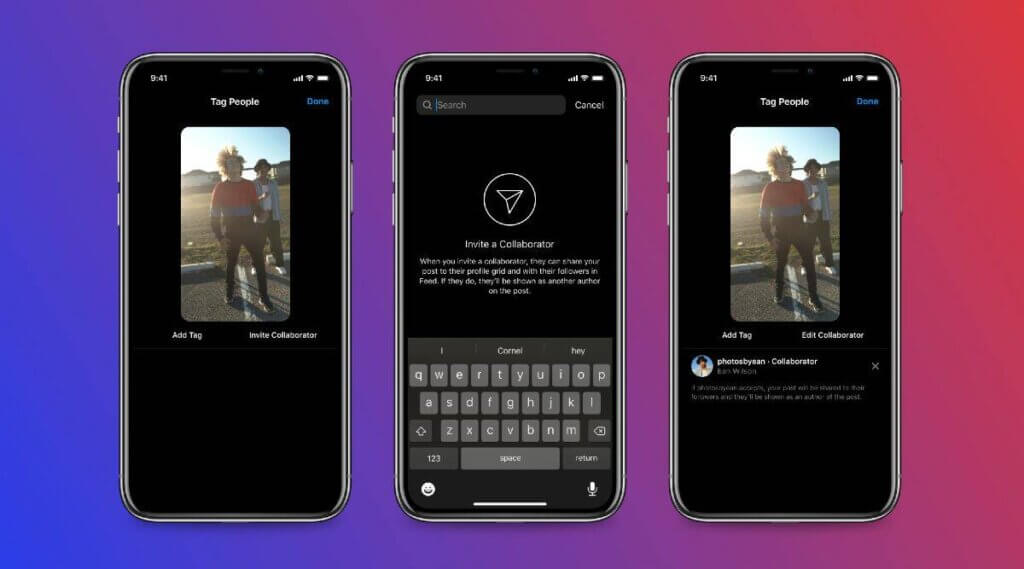
    Invite a Collaborator Feature on Instagram
    Image Source: Indian Express

    When the other person will accept their invitation to show up as a collaborator on their content, the same content will appear on the other person’s profile and be visible to its followers for broader engagement and reach. This means, through this collab feature, the content will be visible on both collaborators’ profile grid and feature, and both will be able to share & see the feedback on that content.

    The collab feature is testing with the intent to make it easier for the influencers and content creators to share each other’s content on their profiles for mutual benefit.

    Also Check: Instagram Translation Feature for Stories & Feed Posts

    How does the “Collab” feature will work in the app?
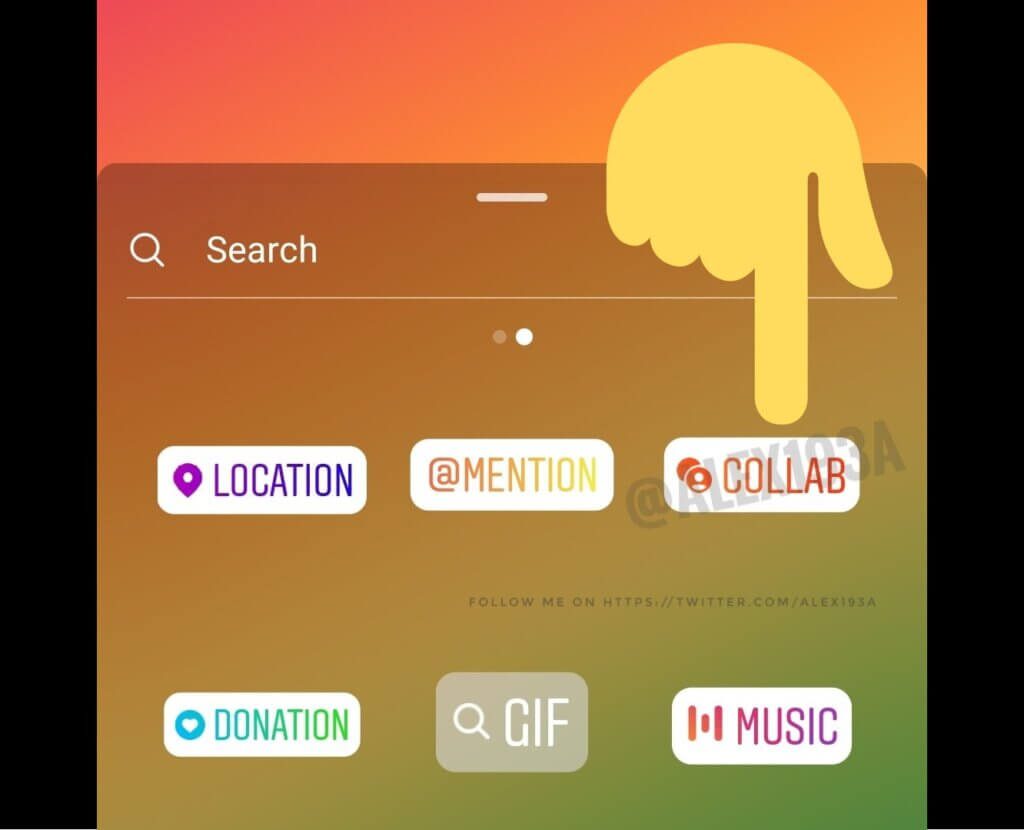
    How to use Collab Feature on Instagram
    Image Source: Blogspot

    If you are thinking about how this latest “collab” feature will work in the app, the company has explained it as follows:

    • To use this feature on your profile, you have to upload the feed post or reel generally as you do, and at the end of the share screen, you will get an option to “Tag People”.
    • By clicking on this “tag people” option, you will be able to invite a collaborator under the option “Invite Collaborator”.
    • You can search the username you want to add as a collaborator. Once the account accepts your invitation to collab, your content will be visible on their profile grid and feed. This way, you both will be able to see the shared feedback of the content.

    One thing to note here about this feature is that only the public accounts will be able to be the part of this test as a collaborator. Upon accepting the invitation to collab, the creator will be added to the tag screen and noted in your post’s header.

    Final Words!

    Isn’t this latest Instagram Collab Feature sounds interesting to you? Yeah, it indeed is, and we are really excited to see when the platform will officially release this feature in India and UK. What do you think about this feature? Tell us in the comments, and for more latest social media updates, don’t forget to check our latest articles!

    how to use instagram collab feature instagram collaborator feature invite a collaborator on Instagram
    Divya Gupta
    • Facebook

    A professional content creator who loves to write about the latest trends, fashion, technology, and everything you might probably looking to search on Google. Every news or story is worth sharing if you know how to write it!

    Related Posts

    Instagram Instants Explained: What It Is, How It Works, and Why Creators Should Care

    May 18, 2026

    How to Schedule Instagram Reels, Stories & Posts Automatically 

    May 16, 2026

    The Complete Guide to Deactivating or Deleting Instagram

    May 12, 2026

    How to See Your Subscribers on YouTube (Even the Hidden Ones)

    May 4, 2026
    Recent Posts
    • Instagram Instants Explained: What It Is, How It Works, and Why Creators Should Care May 18, 2026
    • Stretching Freelance Budgets: Crafting Unified Visual Identities With Ouch May 18, 2026
    • How to Schedule Instagram Reels, Stories & Posts Automatically  May 16, 2026
    • Why I Started Using Residential Proxies After Getting Blocked 47 Times in One Week May 13, 2026
    • The Complete Guide to Deactivating or Deleting Instagram May 12, 2026
    • How to Save TikTok Content Online Without Installing Extra Apps May 7, 2026
    • Best B2B SaaS AI SEO Firms in London for Organic Growth in 2026 May 7, 2026
    Categories
    • Business
    • Content Marketing
    • Entertainment
    • News
    • SEO
    • Social Media
    • Technology
    • Twitter
    Social Media

    Instagram Adds Voice Messaging Feature to Direct Messages

    By Mini JainDecember 31, 20180

    A new update of voice messages is now a part of Direct messaging on Instagram.…

    Top Mistakes Indie Artists Make on Spotify and How to Fix Them

    September 22, 2025

    10 Ways to Use Micro-Influencers for Brand Marketing

    February 1, 2023

    7 Cool Ways to Increase Your YouTube Reach in 2021

    April 22, 2021
    The SocioBlend Blog
    Facebook X (Twitter) Instagram Pinterest Vimeo YouTube
    © 2026 SocioBlend. Developed by Jitendra Kumar Singh.

    Type above and press Enter to search. Press Esc to cancel.